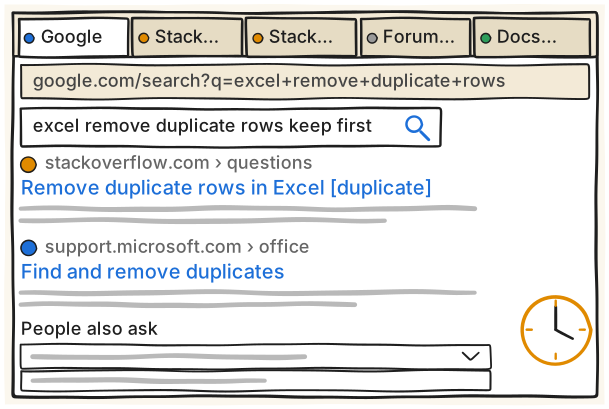
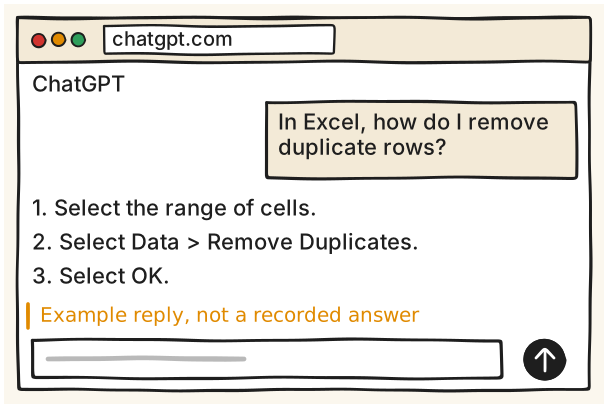
A วันนี้ five tabs for one answerB ผลลัพธ์ same question, example reply
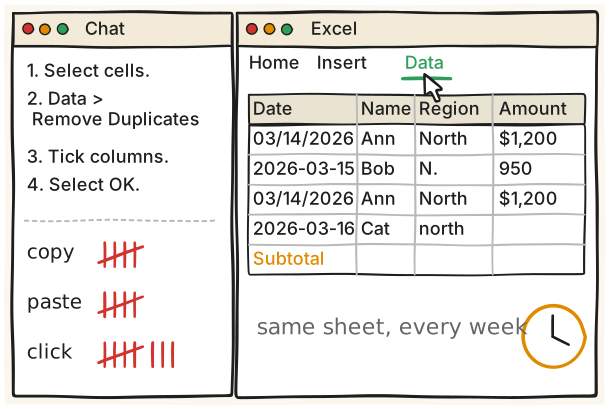
ประโยคเดโมIn Excel, how do I remove duplicate rows? Give me numbered steps with the exact menu names.
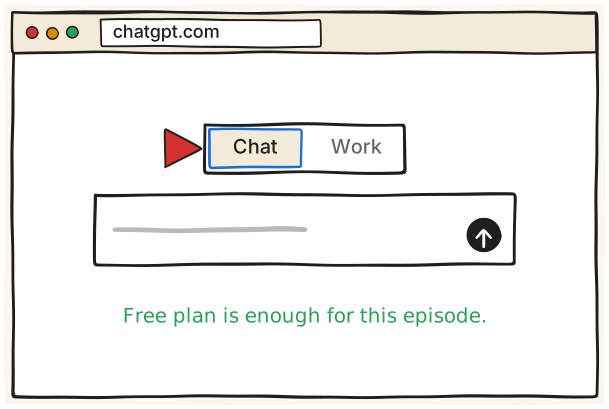
1 เปิด ChatGPT แล้วเลือก Chat Open ChatGPT, pick Chat อ่านเพิ่ม
เข้า chatgpt.com, sign in, แล้วเลือก Chat
ChatGPT แยกหน้าแชตใหม่เป็นสวิตช์ Chat กับ Work เอกสารของ OpenAI บอกว่า 'For an answer or conversation, select Chat.' ส่วน Work ไว้สำหรับงานหลายขั้นตอน ตอนที่ 1 เราใช้แค่ Chat แผน Free พอสำหรับตอนนี้ หน้า chatgpt.com/pricing (ณ 18 พ.ย. 2026) ระบุว่า Free มี 'Unlimited text chats with GPT-6' และ 'Limited messages with uploads' (ใต้ตารางมีหมายเหตุ 'Unlimited text chats subject to abuse guardrails.') ตำแหน่งสวิตช์: เอกสารฝั่ง desktop app บอกว่าอยู่ 'at the top of the new chat page, above the composer' แต่เอกสารฝั่งเว็บไม่ได้บอกตำแหน่ง ภาพในการ์ดจึงวาดแบบทั่วไป หน้าจอจริงอาจต่างออกไป
เปิด https://chatgpt.com แล้ว sign in ด้วยบัญชี ChatGPT (เอกสาร: 'sign in with your ChatGPT account')
ที่หน้าแชตใหม่ หาสวิตช์ Chat / Work แล้วเลือก Chat
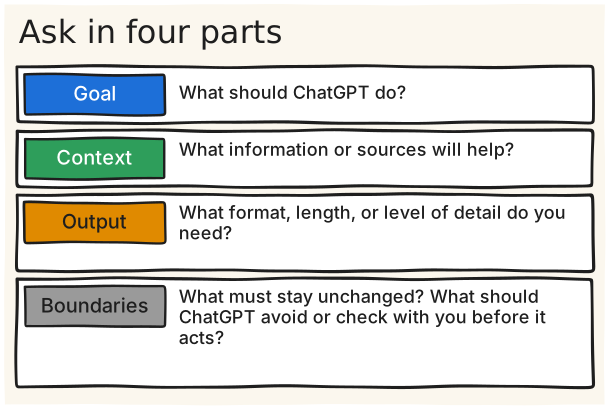
OpenAI มีรูปแบบสี่ส่วนสำหรับเขียน prompt: Goal ('What should ChatGPT do?'), Context ('What information or sources will help?'), Output ('What format, length, or level of detail do you need?'), Boundaries ('What must stay unchanged? What should ChatGPT avoid or check with you before it acts?') เอกสารบอกเองว่า 'A short prompt is often enough.' และ 'You don't need to fill in every item or follow a required format.' ดังนั้นสอนเป็นตัวช่วยสำหรับคำถามที่สำคัญหรือยาก ไม่ใช่ฟอร์มที่ต้องกรอกทุกครั้ง
เปิดแชตใหม่ใน Chat
Goal: บอกว่าอยากให้ ChatGPT ทำอะไร (คำถามนำของ OpenAI: 'What should ChatGPT do?')
Context: ข้อมูลหรือแหล่งที่ช่วยได้ เช่น โปรแกรม จำนวนแถว (คำถามนำ: 'What information or sources will help?')
Output: รูปแบบ ความยาว ระดับรายละเอียด (คำถามนำ: 'What format, length, or level of detail do you need?')
Boundaries: อะไรห้ามเปลี่ยน อะไรให้ถามก่อนทำ (คำถามนำ: 'What must stay unchanged? What should ChatGPT avoid or check with you before it acts?')
แบบเปล่าที่ใช้ซ้ำ (เขียนขึ้นสำหรับทอล์กนี้ จากสี่ส่วนของ OpenAI): 'Goal: [what you want done]' / 'Context: [who, where, what you have]' / 'Output: [format and length]' / 'Boundaries: [what not to do, when to ask you first]'
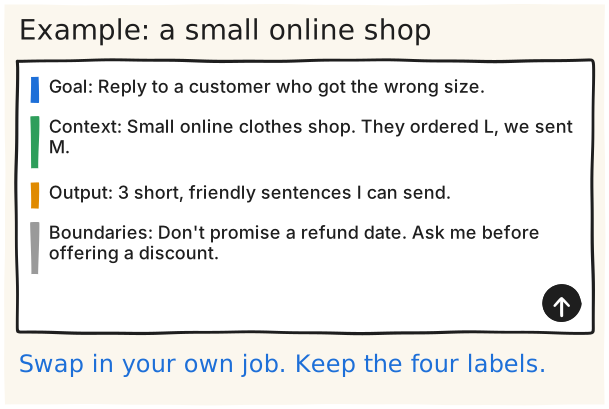
ตัวอย่างนี้เขียนขึ้นสำหรับทอล์กนี้ เป็นงานของเจ้าของร้านออนไลน์เล็กๆ ที่ต้องตอบลูกค้า ไม่ได้มาจากเอกสารของ OpenAI และยังไม่ได้รัน ให้แทนทั้งสี่บรรทัดด้วยงานของคุณเอง สังเกตว่า Boundaries ใช้บอกสิ่งที่ห้ามทำและสิ่งที่ต้องถามก่อน ตรงกับที่ OpenAI อธิบายส่วนนี้ ตัวอย่าง boundary ของ OpenAI เอง เช่น 'Prepare the message as a draft. Don't send it.'
คัดลอกสี่บรรทัดนี้ไปใส่แชต:
Goal: Reply to a customer who got the wrong size.
Context: Small online clothes shop. They ordered L, we sent M.
Output: 3 short, friendly sentences I can send.
Boundaries: Don't promise a refund date. Ask me before offering a discount.
แทนด้วยงานของคุณ ตัวอย่างงานออฟฟิศ: 'Goal: Write a short email asking a supplier to confirm the delivery date.' / 'Context: We ordered 200 boxes on Monday and the shop opens on Friday.' / 'Output: 4 sentences, polite.' / 'Boundaries: Don't mention price. Ask me before you propose a new date.'
ยังไม่ได้ตรวจ The shop and office examples are written for this talk and were NOT run, so the expected reply on see is an expectation, not a recorded result. Only the four-part pattern and the 'Prepare the message as a draft. Don't send it.' boundary example come from the OpenAI page (opened 18 Nov 2026).
4 สั่งเป็นผลลัพธ์ ไม่ใช่ขั้นตอน Ask for the result อ่านเพิ่ม
บอกว่าอยากได้อะไรตอนจบ และใครเป็นคนอ่าน
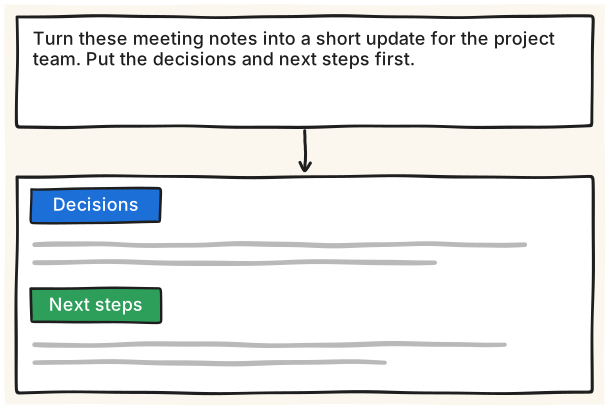
OpenAI แนะนำว่า 'Start with the result, not a detailed list of steps.' ตัวอย่างของเขาคือสั่งให้เปลี่ยนโน้ตประชุมเป็นข้อความสั้นให้ทีม โดยบอกให้เอาการตัดสินใจกับขั้นถัดไปไว้ก่อน ฝั่ง Claude ศูนย์ช่วยเหลือบอกสามอย่างที่ควรใส่ในคำขอ คือ 'Your desired outcome', 'The format' และ 'Inputs Claude will need' ซึ่งตรงกับ Goal, Output, Context ในการ์ดก่อนหน้า
เขียนผลลัพธ์ที่อยากได้ และบอกว่าใครเป็นคนอ่าน
ตัวอย่างของ OpenAI: 'Turn these meeting notes into a short update for the project team. Put the decisions and next steps first.'
วางโน้ตของคุณต่อท้ายหรือแนบไฟล์
อ่านร่างที่ได้ แล้วปรับด้วยการ์ด Fix it
ฝั่ง Claude: outcome, format และ inputs ที่ต้องใช้ (ศูนย์ช่วยเหลือ Claude)
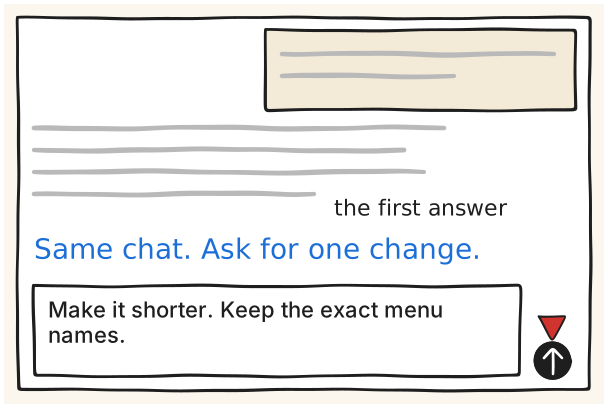
OpenAI บอกว่า 'Your first prompt doesn't need to be perfect.' ให้อ่านคำตอบก่อน แล้วขอแก้เฉพาะจุดที่ไม่ตรงในแชตเดิม ตัวอย่างของ OpenAI ในหัวข้อ follow-up: 'Make the opening more direct, keep the evidence, and move the recommendation above the background section.' ประโยคใน type ด้านซ้ายเขียนขึ้นให้เข้ากับคำถาม Excel ของตอนนี้ ยังไม่ได้รัน
อ่านคำตอบแรกให้จบ แล้วระบุจุดเดียวที่อยากแก้
พิมพ์ในแชตเดิม: 'Make it shorter. Keep the exact menu names.' (เขียนขึ้นสำหรับทอล์กนี้)
ตัวอย่างของ OpenAI สำหรับ follow-up: 'Make the opening more direct, keep the evidence, and move the recommendation above the background section.'
ยังไม่ได้ตรวจ The on-screen follow-up sentence is written for this talk and NOT run; see is what is expected, not a recorded reply. OpenAI's own example sentence is in steps.
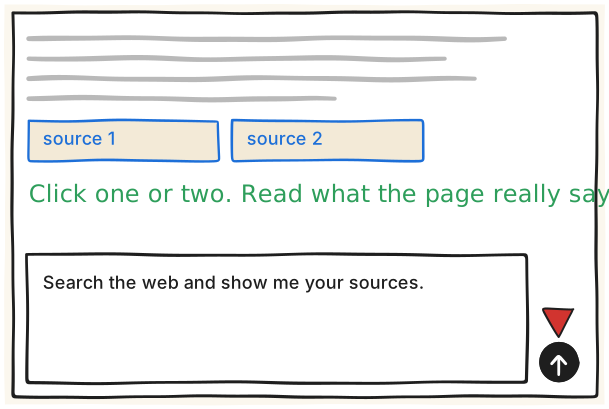
เอกสาร web search ของ OpenAI บอกว่า 'Search results and citations appear in the chat when ChatGPT uses web search.' และเตือนว่า 'Treat all web results as untrusted input.' หน้า prompting ก็แนะนำให้ 'ask for sources when you need to check the result.' ลิงก์พิสูจน์ได้แค่ว่าข้อความมาจากไหน ไม่ได้พิสูจน์ว่าถูก ให้เปิดอ่านหนึ่งถึงสองลิงก์เอง หน้าตาของ citation ในภาพวาดแบบทั่วไป ของจริงอาจต่างออกไป เอกสารบอกด้วยว่า workspace settings อาจจำกัดการค้นเว็บ
ถามคำถามตามปกติ
ถ้าคำตอบขึ้นกับข้อมูลปัจจุบัน พิมพ์ต่อ: 'Search the web and show me your sources.' (เขียนขึ้นสำหรับทอล์กนี้)
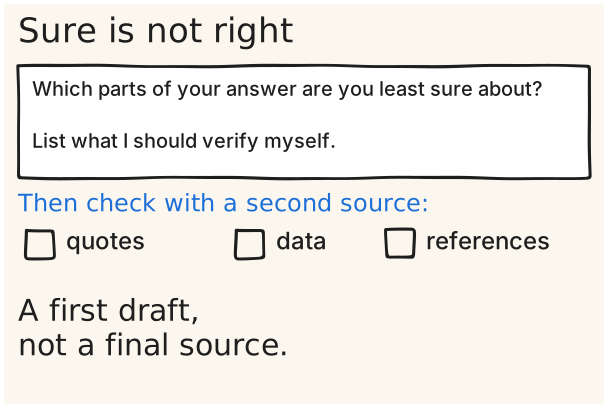
Which parts of your answer are you least sure about?
List what I should verify myself.
ศูนย์ช่วยเหลือของ OpenAI เขียนว่า 'Sometimes, it might sound confident—even when it's wrong.' และมีรายการว่าอาจเกิด 'Fabricated quotes, studies, citations or references to non-existent sources' คำแนะนำคือ 'Use ChatGPT as a first draft, not a final source.' และ 'Always verify quotes, data, technical information or references to external documents.' prompt ใน type เป็นแค่ตัวช่วยให้คุณรู้ว่าจะเช็กตรงไหน ไม่ใช่หลักฐานว่าถูก ตัวอย่างในตอนนี้: เอาคำตอบ Excel ไปเทียบกับหน้า Microsoft ที่เขียนว่า 'Select Data > Remove Duplicates' และ 'the duplicate data is permanently deleted' ถ้าคำตอบของ ChatGPT ไม่เตือนเรื่องนี้ ให้ถามต่อ
ถามต่อ: 'Which parts of your answer are you least sure about?' แล้ว 'List what I should verify myself.' (เขียนขึ้นสำหรับทอล์กนี้)
เช็กกับแหล่งที่สองก่อนใช้ เรื่องคำพูดที่อ้าง ข้อมูล และแหล่งอ้างอิง (OpenAI: 'Always verify quotes, data, technical information or references to external documents.')
ตัวอย่างของตอนนี้: เปิดหน้า Microsoft (find-and-remove-duplicates) แล้วดูว่าเมนู Data > Remove Duplicates ตรงกับที่ ChatGPT บอกไหม
Microsoft ยังแนะนำให้คัดลอกข้อมูลเดิมไปไว้อีกชีตก่อนลบ เพราะ 'the duplicate data is permanently deleted' (ตรงกับตอนที่ 2)
ยังไม่ได้ตรวจ The OpenAI help page was read through a fetch tool only (curl got HTTP 403), so open it in a browser and confirm the quotes before they go on a slide. The follow-up prompt is written for this talk and NOT run; see is an expectation, and a model's own list of doubts is not evidence that anything is right. The earlier 'laws, medicine or money' list was removed: no source opened says it.
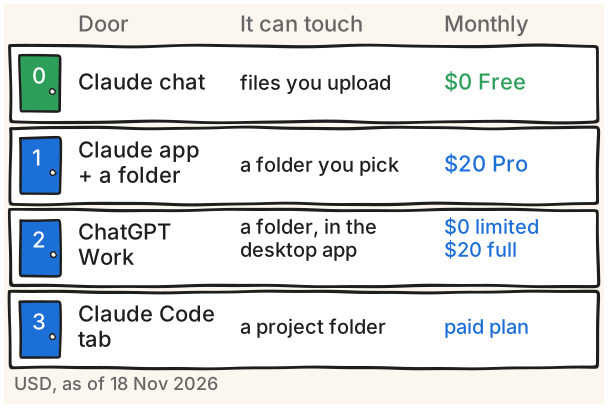
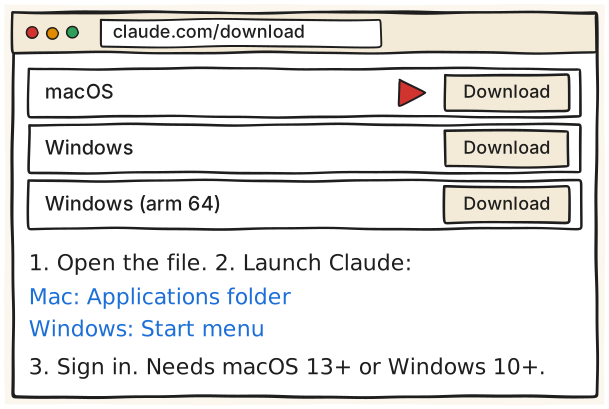
ประตู 0: Claude แบบแชต แผน Free ทำ artifact และไฟล์ในแชตปกติได้ ไม่ต้องติดตั้ง ประตู 1: Claude desktop app แล้วให้ Claude เข้าถึงโฟลเดอร์ในเครื่อง (Cowork) ต้องแผนเสียเงิน ประตู 2: ChatGPT Work ณ 18 พ.ย. 2026 หน้า chatgpt.com/pricing ระบุว่า Free และ Go ได้ Work แบบ 'Limited (desktop app)' ส่วน Plus และ Pro ได้ 'Desktop, web, and mobile' ถ้าอยากให้แตะไฟล์ในเครื่องต้องใช้ desktop app เพราะ Work บนเว็บและมือถือเข้าถึงไฟล์ในเครื่องโดยตรงไม่ได้ ส่วน Claude แบบแชตแผน Free ทำ artifact ได้ แต่ไม่มี Cowork และไม่มี Claude Code ประตู 3: แท็บ Code ใน Claude desktop app ใช้โฟลเดอร์โปรเจกต์ ไม่ต้องพิมพ์คำสั่ง ราคาทั้งหมดเป็น USD ตามหน้าราคาของผู้ให้บริการ ณ 18 พ.ย. 2026 ราคาเป็นบาทและราคาใน app store ยังไม่ได้ตรวจ บัญชี Claude บางบัญชีได้ประสบการณ์ใหม่ที่รวม Chat กับ Cowork เป็นกล่องเดียวแล้ว จึงไม่เห็นปุ่ม Cowork ให้พูดออกเสียงตอนสาธิตว่าบัญชีของคุณเป็นแบบไหน
ประตู 0, Claude chat (Free $0): เปิด https://claude.ai ได้เลย ไม่ติดตั้ง ใช้กับไฟล์ที่อัปโหลด และสร้าง artifact กับไฟล์ที่ดาวน์โหลดได้ (Artifacts available on Free, Pro, Max, Ultra, Team, Enterprise)
ประตู 1, Claude app + โฟลเดอร์: ต้อง Claude Desktop และแผนเสียเงิน Pro $20 ต่อเดือนถ้าจ่ายรายเดือน หรือ $17 ต่อเดือนถ้าจ่ายรายปี ($200 จ่ายล่วงหน้า) Max $100 ต่อเดือน Ultra $200 ต่อเดือน (claude.com/pricing) Cowork 'available on paid plans (Pro, Max, Ultra, Team, and Enterprise)'
ประตู 2, ChatGPT Work (ณ 18 พ.ย. 2026): Free $0, Go $8, Plus $20, Pro เริ่ม $100 ต่อเดือน (แผนที่ $100, $200 หรือ $500) ราคามาจาก learn.chatgpt.com/docs/pricing ตารางเทียบแผนบน chatgpt.com/pricing ระบุ ChatGPT Work ว่า Free และ Go 'Limited (desktop app)', Plus และ Pro 'Desktop, web, and mobile' และการ์ด Free เขียนว่า 'Limited ChatGPT Work access on desktop' การ์ด Plus เขียนว่า 'Expanded access to ChatGPT Work on desktop, web, and mobile' ดังนั้น Work บนเว็บและมือถือเป็นของ Plus และ Pro ส่วน Free และ Go ใช้ได้เฉพาะ desktop app แบบจำกัด
ประตู 3, Claude Code (แท็บ Code): 'Claude Code is included in all paid plans' แผน Free ไม่มี (claude.com/pricing)
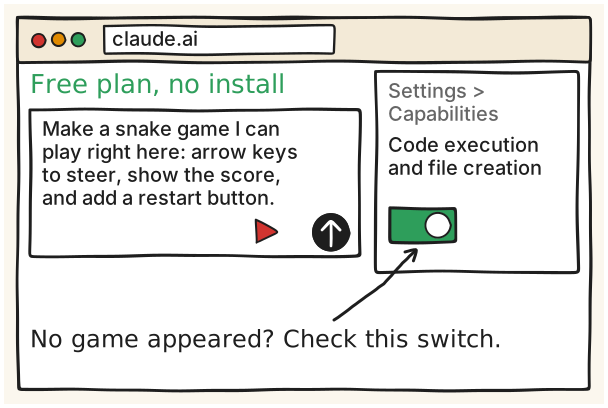
เปิด claude.ai, sign in, แล้วพิมพ์ประโยคนี้ในแชตปกติ
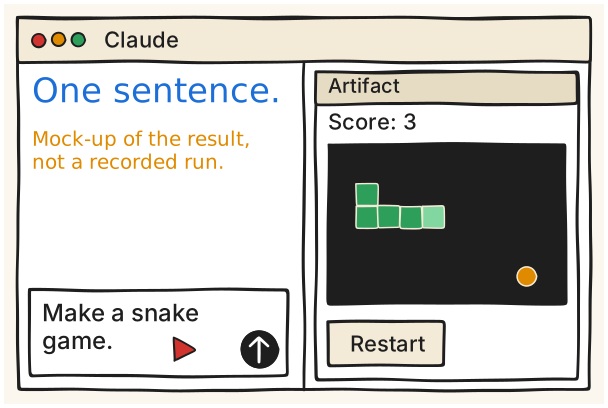
Make a snake game I can play right here: arrow keys
to steer, show the score, and add a restart button.
เอกสารของ Claude บอกว่า artifact ใช้ได้ทุกแผนรวม Free และ 'An artifact opens in its own window beside your conversation.' ทุกอย่างที่สร้างจะเก็บในแท็บ Artifacts ที่ sidebar สำหรับไฟล์ออฟฟิศ Claude สร้าง .xlsx, .pptx, .docx และ PDF ที่ดาวน์โหลดได้ ขนาดไม่เกิน 30MB ต่อไฟล์ ฟีเจอร์นี้ต้องเปิดใน Settings > Capabilities ที่ชื่อ 'Code execution and file creation' (ชื่อใหม่ 'Create and edit files') ปกติเปิดไว้ให้ทุกผู้ใช้ ประโยคด้านซ้ายเขียนขึ้นสำหรับทอล์กนี้ ยังไม่ได้รัน เอกสารไม่ได้อธิบายขั้นตอนการเล่นเกมใน artifact ต้องซ้อมเอง
เปิด https://claude.ai แล้ว sign in (แผน Free ใช้ได้)
ในแชตปกติ พิมพ์: 'Make a snake game I can play right here: arrow keys to steer, show the score, and add a restart button.'
รอให้ Claude ตอบ ดูหน้าต่าง artifact ที่เปิดข้างบทสนทนา (ตามเอกสาร: 'An artifact opens in its own window beside your conversation.')
ถ้าไม่เห็น artifact หรือไม่ได้ไฟล์: Settings > Capabilities แล้วเปิด 'Code execution and file creation' (เมนูรุ่นใหม่ชื่อ 'Create and edit files')
งานไฟล์ออฟฟิศ: ขอเป็น .xlsx, .pptx, .docx หรือ PDF แล้วดาวน์โหลด ไฟล์ละไม่เกิน 30MB
ถ้าต้องการให้ได้ไฟล์ snake.html ในโฟลเดอร์จริง ใช้ประตู 3 ด้วยประโยคจากงานวิจัย: 'Make a snake game I can play in my browser. Put it in one file called snake.html. Arrow keys to steer, show the score, and add a restart button.' (ยังไม่ได้รัน ผลที่ได้เป็นสิ่งที่คาดไว้เท่านั้น เอกสาร terminal-guide บอกว่า 'Once Claude creates the files, double-click the HTML file to open it in your browser.')
ระวัง ไม่เห็นหน้าต่างเกม? เปิด Code execution and file creation
รันจริงแล้ว Ran on 19 Nov 2026: the exact sentence on this card, given to Claude Code (`claude -p --model sonnet`) in an empty folder, wrote one working snake.html in about 30 s. The game has a score, a Best score, a Restart button, arrow-key steering, and a Game Over screen. A script drove the keys (a person was not playing) and the game ended on its own when the snake hit the wall. This was Claude Code, not the chat window the card teaches, so the chat window itself (the Claude app or claude.ai) was NOT tested. Files and a recording are in deck/how/fallback/ep2.
ยังไม่ได้ตรวจ The sentence is written for this talk and has NOT been run. The docs say only that an artifact opens beside the conversation; no page shows a snake game opening or being playable, so see is an expectation. Rehearse it three times before claiming it works.
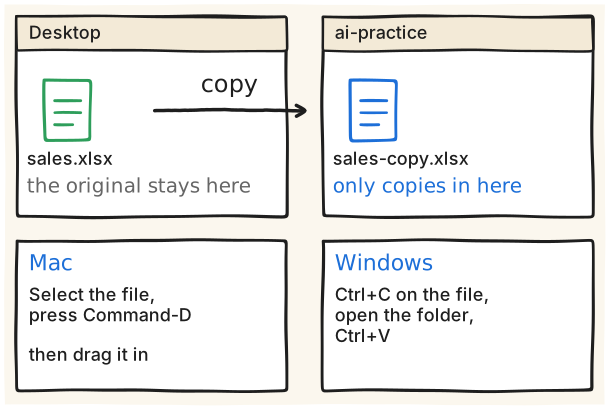
Mac: Command-D, then drag the copy in
Windows: Ctrl+C, open the folder, Ctrl+V
ทุกเจ้าแนะนำให้ทำงานกับสำเนา Anthropic เขียนว่า 'Claude can read, write, and permanently delete these files' และแนะนำ 'Consider creating a dedicated working folder for Claude rather than granting broad access' กับ 'keep backups of important files' คู่มือ cleanup ของ OpenAI บอกให้ clean a copy และ 'keep the original file unchanged' ส่วน Microsoft บอกว่าก่อนลบข้อมูลซ้ำ 'it's a good idea to move or copy the original data to another worksheet' ใช้ไฟล์ปลอมที่เตรียมเอง ห้ามใช้ข้อมูลลูกค้าจริง สำเนาคือที่ย้อนกลับจริงๆ ของเรา เพราะการ undo ของ agent ไม่ครอบคลุมทุกอย่าง (ดูการ์ด What can go wrong)
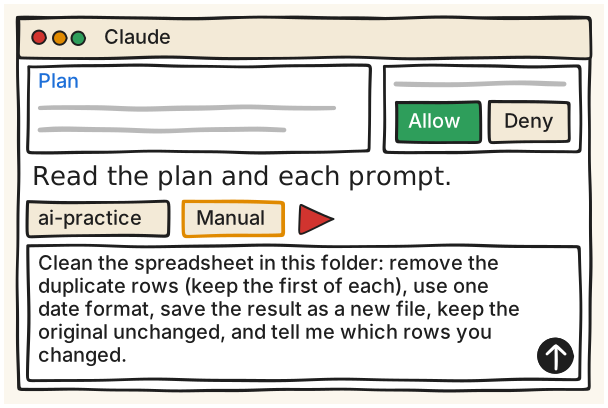
ประโยคที่ใช้อยู่บนจอ (เขียนขึ้นสำหรับทอล์กนี้ ยังไม่ได้รัน): 'Clean the spreadsheet in this folder: remove the duplicate rows (keep the first of each), use one date format, save the result as a new file, keep the original unchanged, and tell me which rows you changed.' เอกสาร Claude บอกให้ 'Review Claude's approach, then let it run.' โหมด Manual คือ 'Manually approve (Manual)': 'Claude pauses and asks for approval for actions' และ 'You review each request and choose Allow or Deny.' Cowork ขอสิทธิ์ชัดเจนก่อนลบไฟล์ถาวร และต้องเปิด desktop app ค้างไว้ ถ้าปิดแอป session ยังรันต่อ แต่ 'can't reach your local files' แผน Pro, Max, Ultra งาน Cowork ใหม่รันบน cloud ของ Anthropic ไฟล์ที่เปิดผ่านแอปจึงถูกประมวลผลบนเซิร์ฟเวอร์ ปุ่มสำหรับให้สิทธิ์โฟลเดอร์: เอกสารไม่ระบุชื่อปุ่ม ภาพวาดเป็นแบบทั่วไป ต้องจับภาพจริงตอนซ้อม
Claude Desktop, ประตู 1: ในกล่องข้อความเลือก 'Cowork' (ข้ามถ้าไม่เห็นตัวเลือก Chat/Cowork เพราะบัญชีได้ประสบการณ์ที่รวมแล้ว: 'every conversation can take on a Cowork task')
ให้ Claude เข้าถึงโฟลเดอร์ ai-practice (เอกสาร: 'give Claude access to a folder on your computer') โฟลเดอร์ที่ให้สิทธิ์จะอยู่ใน 'Trusted folders' ชื่อปุ่มจริงยังไม่ยืนยัน
พิมพ์ประโยค: Clean the spreadsheet in this folder: remove the duplicate rows (keep the first of each), use one date format, save the result as a new file, keep the original unchanged, and tell me which rows you changed.
อ่านแผนของ Claude ก่อน ('Review Claude's approach, then let it run.') ดู progress indicators แล้วอ่านทุก permission prompt ก่อนกด Allow หรือ Deny
เปิดไฟล์ใหม่ที่ได้ในโฟลเดอร์ ไม่ใช่ไฟล์ต้นฉบับ แล้วทำตามการ์ด Check the result yourself
ChatGPT Work, ประตู 2, desktop app: เลือก ChatGPT แล้วสลับเป็น Work จากนั้น 'Start a chat, create a project, or open a folder' และเลือกโฟลเดอร์ ai-practice ('ChatGPT can read and modify files in the folder you choose.')
ChatGPT Work บนเว็บ: เลือก Work แล้วแนบไฟล์สำเนา (Work บนเว็บเข้าถึงไฟล์ในเครื่องโดยตรงไม่ได้) Work บนเว็บใช้ได้กับ Plus และ Pro ส่วน Free และ Go ใช้ได้เฉพาะ desktop app แบบจำกัด ตาม chatgpt.com/pricing ณ 18 พ.ย. 2026
prompt แบบยาวของ OpenAI สำหรับ Work (แทนชื่อไฟล์เป็นของคุณ): 'Clean @your-file.csv.' / 'What's wrong:' / '- dates are mixed between MM/DD/YYYY and YYYY-MM-DD' / '- currency values include $, commas, and blank cells' / '- a few duplicate customer rows came from repeated exports' / '- region and category names use several aliases' / '- there are pasted summary rows mixed into the data' / 'What I want:' / '- write a cleaned CSV' / '- keep the original file unchanged' / '- use one date format' / '- keep blank currency cells blank' / '- preserve source row IDs when possible' / '- add a short data-quality note with rows you changed, removed, or could not clean confidently'
ยังไม่ได้ตรวจ The exact button or menu for giving Cowork access to a folder is not named in any Claude help page I opened (get-started, merged Chat and Cowork, web/desktop/mobile article); they only say 'give Claude access to a folder on your computer' and list 'Trusted folders'. The on-screen folder chip, the Manual chip and the 'Plan' box are drawn generically. The cleanup sentence is written for this talk and has NOT been run, so see is an expectation. The ChatGPT long-form prompt is OpenAI's published starter prompt with the file name swapped. Plan availability of ChatGPT Work is from chatgpt.com/pricing as of 18 Nov 2026 (see e2-01 for the other wordings).
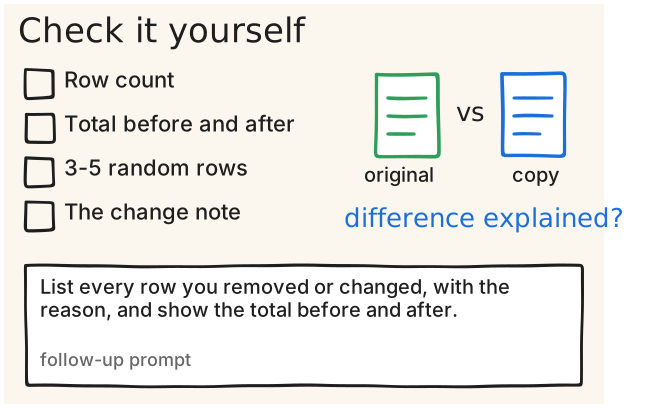
List every row you removed or changed, with the
reason, and show the total before and after.
สี่ข้อเช็กในการ์ดนี้ (จำนวนแถว ยอดรวม สุ่ม 3-5 แถว และอ่านบันทึกการเปลี่ยนแปลง) เป็นคำแนะนำของทอล์กนี้เอง ไม่ใช่กฎของผู้ให้บริการ คู่มือ cleanup ของ OpenAI ปิดท้ายว่า 'Review the cleaned copy before using it.' และให้ 'open the cleaned file and the data-quality note from the chat before using the data downstream' ประโยค follow-up ใน type เขียนขึ้นสำหรับทอล์กนี้ ยังไม่ได้รัน ผลที่ได้เป็นรายการให้คุณตรวจเอง ไม่ใช่หลักฐานว่าถูก
เปิดไฟล์ผล (สำเนาที่ทำใหม่) ข้างๆ ไฟล์ต้นฉบับ
เทียบจำนวนแถว: แถวที่หายไปควรเท่ากับจำนวนแถวซ้ำที่ Claude บอก (คำแนะนำของทอล์กนี้)
ยังไม่ได้ตรวจ The four checks, the before/after total check and the follow-up sentence are written for this talk (outline), not vendor advice, and none of it was run, so see is an expectation. Do not say the total 'must match' the original: the cleanup guide itself lists duplicate customer rows and pasted summary rows as mess to remove, which changes the total. Only the 'Review the cleaned copy' and 'open the cleaned file and the data-quality note' quotes come from OpenAI's cleanup guide.
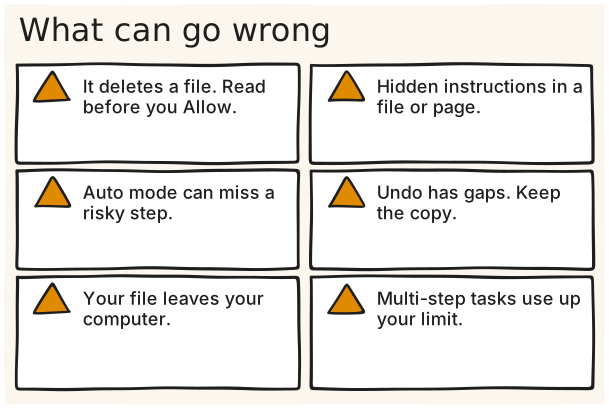
ลบไฟล์: Cowork ขออนุญาตก่อน 'Claude requires your explicit permission before permanently deleting any files.' ต้องกด Allow จึงจะลบ ให้อ่านก่อนกด
คำสั่งแอบแฝง (prompt injection): ข้อความที่ซ่อนอยู่ในไฟล์หรือหน้าเว็บอาจชี้นำ Claude Anthropic บอกว่า 'the chances of an attack are still non-zero' และ 'If something feels off, stop the task immediately.' หน้า create and edit files ก็เตือนว่า 'Claude can be tricked into sending information from its context'
โหมด Auto: 'Claude reviews each action for safety' แต่ Auto mode 'can miss risky actions' ส่วนโหมด Skip คือ 'Claude doesn't pause to ask and nothing checks its actions automatically' รอบแรกใช้ Manual
undo ไม่ครอบคลุมทุกอย่าง: ใน Claude Code 'A file that only Bash commands changed isn't tracked and stays as it is.' ดังนั้น /rewind ไม่คืนไฟล์ชนิดนั้น สำเนาจากการ์ด Practice folder คือที่ย้อนกลับจริง
ไฟล์ออกจากเครื่อง: งาน Cowork รวมถึงไฟล์ในเครื่องที่เปิดผ่าน desktop app 'processed on Anthropic's servers rather than staying on your computer' ห้ามใช้ข้อมูลลูกค้าจริง
ถึงลิมิตกลางทาง: 'Each step Claude takes uses tokens' งานหลายขั้นตอน 'use more of your usage than a quick question' ลองรวมงานที่เกี่ยวข้องเป็นงานเดียว
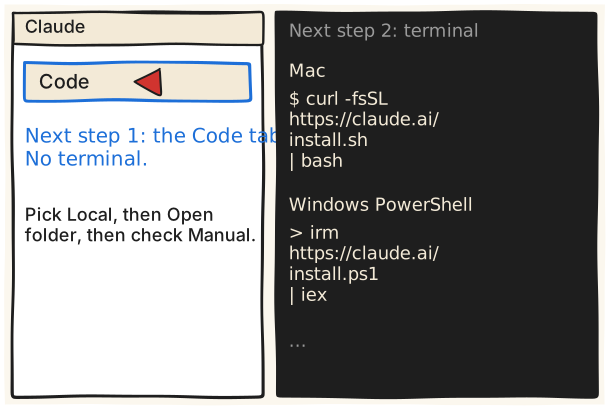
ใน Claude app เปิดแท็บ Code เลือก Local, Open folder และคง Manual ไว้
ทางที่ไม่ต้องใช้ terminal มาก่อน: แท็บ Code ใน Claude Desktop เอกสารบอกว่า 'The desktop app includes Claude Code, so you don't need to install Node.js or the CLI to use the Code tab.' ใน Manual mode 'Claude proposes each change and waits for your approval before applying it' ทาง terminal ไว้เป็นก้าวต่อไปสำหรับคนที่อยากลอง สองบรรทัดใน steps (ติดตั้ง Mac / Windows PowerShell) คือคำสั่งติดตั้งตามเอกสาร บรรทัดแรกสำหรับ Mac บรรทัดที่สองสำหรับ Windows PowerShell ยังไม่ได้รันเลย Claude Code รวมอยู่ในทุกแผนเสียเงิน
แท็บ Code: คลิกแท็บ Code ที่ด้านบนของ sidebar ใน Claude Desktop ('Click the Code tab at the top of the sidebar.')
ใต้กล่อง prompt คลิกตัวเลือกสภาพแวดล้อม ('the environment selector') แล้วเลือกรายการบนสุดในกลุ่ม Local ('the top entry in the Local group') (ถ้าไม่เห็น environment ใต้กล่อง prompt แปลว่าเป็น layout เก่า ตามเอกสาร 'you have the earlier layout')
ตรวจว่าโหมดสิทธิ์เป็น Manual ใน Manual mode จะเห็น 'A diff showing exactly what will change' และ 'Buttons to approve or decline each change'
ถ้ากดแท็บ Code แล้วเจอ 'Prompt to upgrade' แปลว่าต้อง subscribe แผนเสียเงินก่อน
ถ้า Claude สร้างไฟล์ snake.html (ยังไม่ได้รัน) ไฟล์จะอยู่ในโฟลเดอร์ที่เลือก เอกสาร terminal-guide บอกว่า 'Once Claude creates the files, double-click the HTML file to open it in your browser.' ส่วน quickstart ของแท็บ Code ไม่ได้อธิบายการเปิดไฟล์ HTML ในแอป
Terminal, Mac: กด Cmd + Space พิมพ์ Terminal แล้วกด Enter
Terminal, Windows: กด Win + X แล้วเลือก Windows PowerShell (หรือ Terminal)
ติดตั้ง Windows PowerShell: irm https://claude.ai/install.ps1 | iex ('The command shows no progress while Claude Code downloads, so leave the window open and wait.') ถ้าเจอข้อความ irm is not recognized แปลว่าอยู่ใน CMD ให้สลับไป PowerShell
เปิด terminal ใหม่ พิมพ์ claude --version แล้วดูเลขเวอร์ชัน จากนั้น cd เข้าโฟลเดอร์ฝึก พิมพ์ claude แล้ว sign in ผ่านเบราว์เซอร์
กด Esc เพื่อหยุด Claude กลางงาน ('Press Esc to interrupt Claude if it's running.') และ /rewind เปิดเมนูคืนโค้ดหรือบทสนทนา ซึ่งยังไม่ครอบคลุมไฟล์ที่เปลี่ยนด้วยคำสั่ง Bash อย่างเดียว
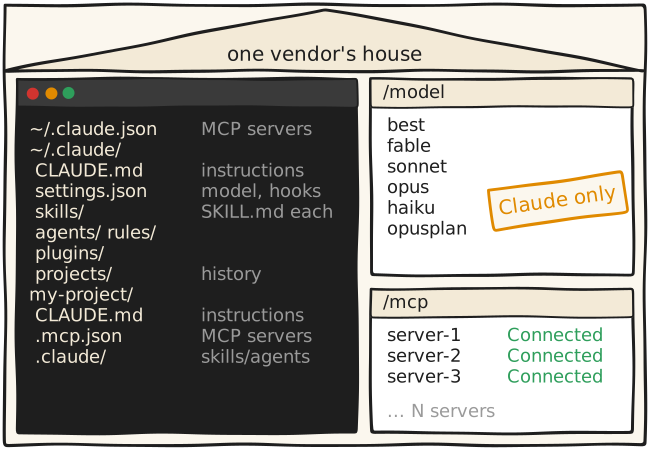
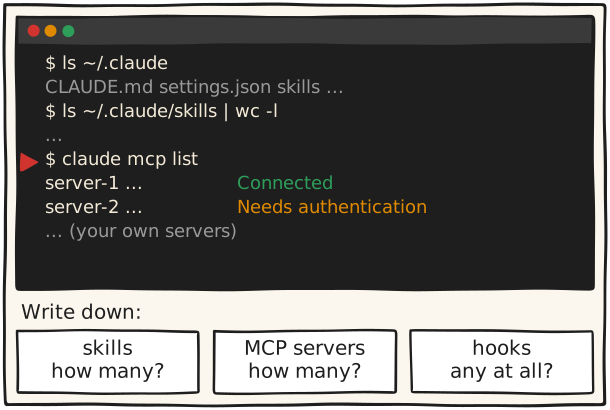
พิมพ์ claude mcp list เอกสารระบุว่าจะพิมพ์ server ทุกตัวพร้อมสถานะ เช่น ✔ Connected, ! Needs authentication, ✘ Failed to connect (รูปแบบแถวจริงไม่ได้ถูกยืนยัน ดูของจริงบนเครื่องคุณ)
ถ้าอยู่ใน session ให้พิมพ์ /mcp จะเห็น panel จัดการ server ชุดเดียวกัน และ sign in ใหม่ได้
3 ล็อกที่ 1: เก้าอี้ของอาจารย์ Lock 1: the chair อ่านเพิ่ม
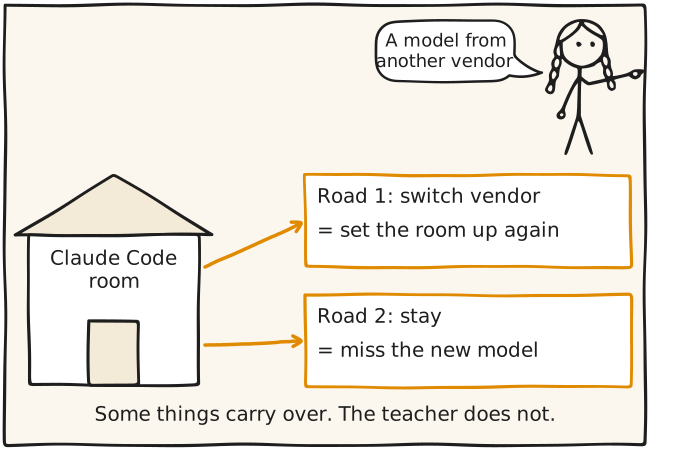
อ่านว่าเอกสารของ Anthropic พูดอะไรเรื่องโมเดลที่ไม่ใช่ Claude ใน Claude Code
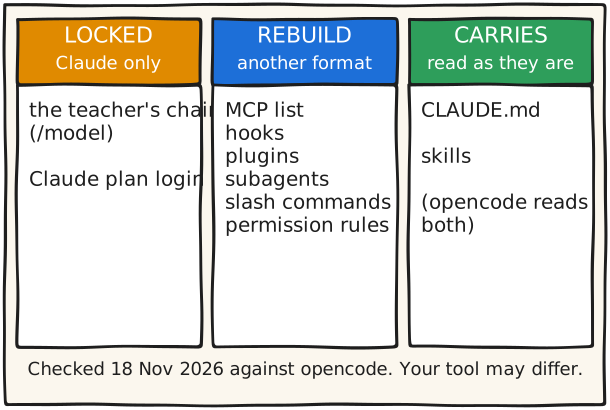
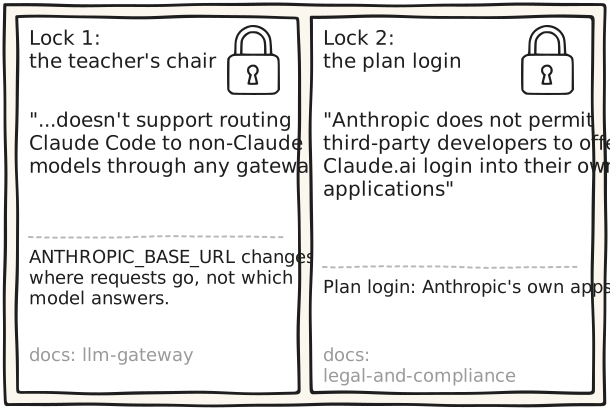
หน้า llm-gateway ของ Claude Code เขียนว่า Anthropic "doesn't support routing Claude Code to non-Claude models through any gateway" และหน้า model-config เขียนว่า ANTHROPIC_BASE_URL เปลี่ยนว่าคำขอถูกส่งไปที่ไหน ไม่ได้เปลี่ยนว่าโมเดลไหนตอบ ถ้าชี้ ANTHROPIC_BASE_URL ไปโฮสต์อื่นที่ไม่ใช่ api.anthropic.com Claude Code จะปิดบางฟีเจอร์ เช่น Remote Control และ server-managed settings ส่วนโมเดลใหม่จากค่ายอื่นมาจริง ตามหน้าของแต่ละเจ้า ณ 18 พ.ย. 2026: หน้า models ของ OpenAI ขึ้น GPT-6.2 Astra และ GPT-6.2 Sol ส่วนหน้า pricing ของ Kimi มี Kimi K3.1 Pro และ Kimi K3 ซึ่งทั้งหมดนี้นั่งใน Claude Code อย่างเป็นทางการไม่ได้
เปิด https://code.claude.com/docs/en/llm-gateway หาประโยค "doesn't support routing Claude Code to non-Claude models through any gateway"
เปิด https://code.claude.com/docs/en/model-config หาประโยค "ANTHROPIC_BASE_URL changes where requests are sent, not which model answers them."
เปิด https://code.claude.com/docs/en/feature-availability หาประโยคว่าชี้ไปโฮสต์อื่นแล้ว Claude Code "turns off features such as Remote Control and server-managed settings"
ดู alias ในหน้า model-config: best, fable, sonnet, opus, haiku, opusplan (และ sonnet[1m], opus[1m]) ทั้งหมดเป็นโมเดล Claude ส่วน default เป็นค่าพิเศษที่ล้าง override ไม่ใช่ alias หน้าตาจริงของ /model ให้ดูบนเครื่องคุณ
เช็กว่าการ login ด้วยแพ็กเกจ Claude ของคุณใช้ที่ไหนได้บ้าง
หน้า legal-and-compliance ของ Claude Code เขียนว่า Anthropic does not permit third-party developers to offer Claude.ai login into their own applications และห้ามส่งคำขอผ่านเครดิตของแพ็กเกจ Free, Pro, Max หรือ Ultra แทนผู้ใช้ สำหรับคนที่สร้างผลิตภัณฑ์บน Claude หน้าเดียวกันบอกให้ใช้ API key authentication ผ่าน Claude Console หรือ cloud provider ที่รองรับ หน้านี้ไม่ได้พูดถึง opencode หรือ OpenRouter โดยตรง สิ่งที่เขียนคือ OAuth ของแพ็กเกจออกแบบไว้ให้ใช้กับ Claude Code และแอปของ Anthropic เอง ส่วนผู้สร้างผลิตภัณฑ์บน Claude ให้ใช้ API key ถ้าจะใช้ Claude ในเครื่องมืออื่น ให้อ่านเงื่อนไขเองก่อน
เปิด https://code.claude.com/docs/en/legal-and-compliance หาประโยคที่ขึ้นต้น "Anthropic does not permit third-party developers to offer Claude.ai login into their own applications"
อ่านต่อ: ห้าม "route requests through Free, Pro, Max, or Ultra plan credentials on behalf of their users"
หาประโยคที่บอกให้ผู้สร้างผลิตภัณฑ์ใช้ "API key authentication through Claude Console or a supported cloud provider"
สรุปให้ตัวเอง: การ login ด้วยแพ็กเกจออกแบบไว้สำหรับ Claude Code และแอปของ Anthropic เอง ส่วนผู้สร้างผลิตภัณฑ์บน Claude ให้ใช้ API key หน้านี้ไม่ได้พูดถึง opencode หรือ OpenRouter ถ้าจะใช้ Claude ในเครื่องมืออื่น ให้อ่านเงื่อนไขของ Anthropic เองก่อน (ราคา API ให้ดูที่หน้าของ Anthropic ในวันงาน ในไฟล์นี้ไม่ได้ระบุราคา)
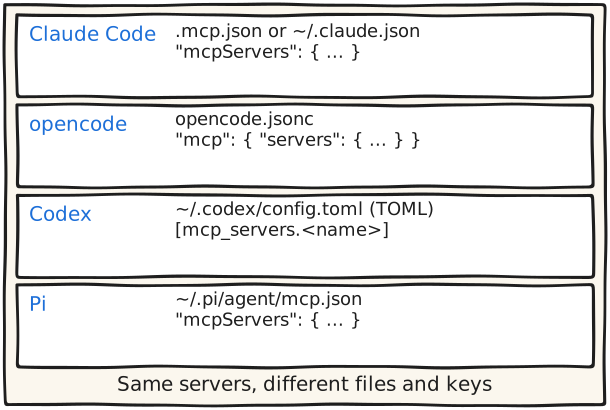
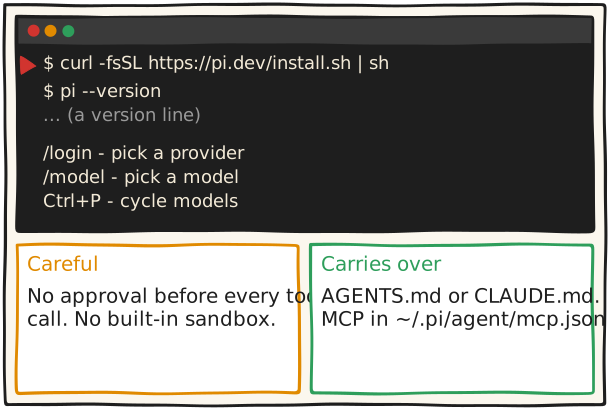
Pi: ไฟล์ ~/.pi/agent/mcp.json ใช้ mcpServers และเพิ่มด้วย pi mcp add เอกสารเขียนว่า "The format matches other MCP clients"
เปิดไฟล์ MCP ของเครื่องมือที่คุณใช้อยู่ นับว่ามีกี่ server แล้วเลือกเฉพาะที่ใช้จริงสัปดาห์นี้ opencode เตือนว่า "MCP tools consume model context, so add only the servers you need"
ควรเห็น สี่เครื่องมือ สามรูปแบบ
ระวัง server ที่ต้อง sign in อาจถามใหม่ในเครื่องมือใหม่
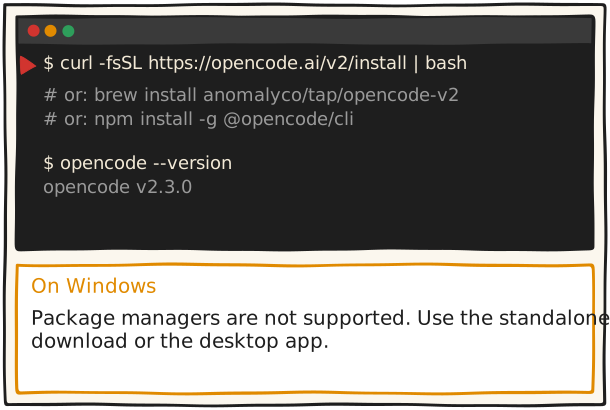
พิมพ์ opencode --version ตอนทดสอบ (18 พ.ย. 2026) ขึ้นว่า opencode v2.3.0 และ opencode run --help แสดงรายการ flag (ของคุณอาจเป็นเลขอื่น) เอกสาร cli/commands เขียนว่า "Every command accepts --help for its full flag list, for example opencode run --help."
Windows: หน้าเอกสารเขียนว่า "Windows package managers are not supported." ให้โหลด standalone CLI binary (ARM64/x64 เป็นไฟล์ .zip ตามลิงก์ในหน้า) หรือแอป desktop (.exe) จากหน้าเดียวกัน
เตรียมโฟลเดอร์ฝึกที่เป็นสำเนา เช่น ~/harness-test แล้ว cd เข้าไป ก่อนพิมพ์ opencode เพื่อเปิดหน้าจอ
ควรเห็น บรรทัดเวอร์ชัน เช่น opencode v2.3.0
ระวัง บน Windows ใช้ package manager ไม่ได้ ให้โหลดตัวติดตั้งหรือแอป desktop
รันจริงแล้ว Ran on 18 Nov 2026 on a machine that already had opencode: `opencode --version` printed `opencode v2.3.0`; `opencode run --help` listed --model, --file, --format, --agent, --auto, --continue, --session. The install one-liner itself was not run.
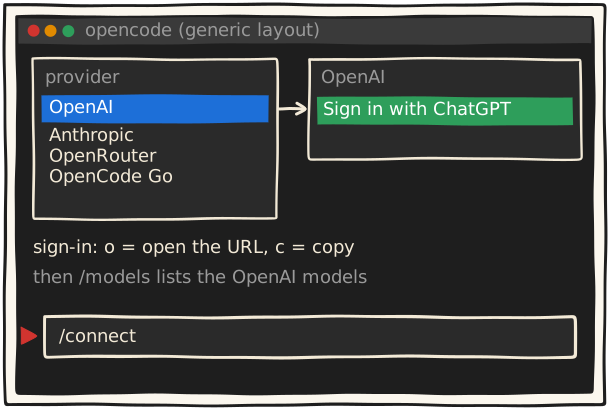
พิมพ์ /connect เลือก OpenAI แล้วเลือก Sign in with ChatGPT
/connect
/models
ทางที่ง่ายที่สุดสำหรับคนที่จ่าย ChatGPT อยู่แล้วคือ sign in ด้วยแพ็กเกจนั้น หน้า providers ของ opencode เขียนว่า "Use a ChatGPT Plus or Pro plan instead of an OpenAI API key." ใช้แล้วจะนับกับโควตาของแพ็กเกจ จึงไม่เห็นค่าใช้จ่ายต่อโมเดล ฝั่ง OpenAI เขียนว่า ChatGPT plan usage เป็นความสามารถเสริมของ Sign in with ChatGPT สำหรับแอป open-source และแอปที่รันในเครื่อง และมีลิงก์หน้า Preview limitations (ยังไม่ได้อ่านหน้านั้น จึงยังไม่ยืนยันว่าเป็น preview) ราคาที่เห็นวันนี้ (18 พ.ย. 2026): ChatGPT Plus $20/เดือน ตามหน้า pricing ของ ChatGPT ถ้าไม่มีแพ็กเกจ ใช้ API key, OpenRouter หรือ OpenCode Go ได้ ดูใน steps
ใน opencode พิมพ์ /connect เลือก OpenAI แล้วเลือก "Sign in with ChatGPT" (มีตัวเลือก sign-in แบบ Codex รุ่นเก่าด้วยตามเอกสาร)
opencode แสดง URL หรือรหัสสำหรับ sign in เอกสาร cli/providers ระบุว่ากด o เพื่อเปิด URL และ c เพื่อคัดลอกรายละเอียดการอนุญาต
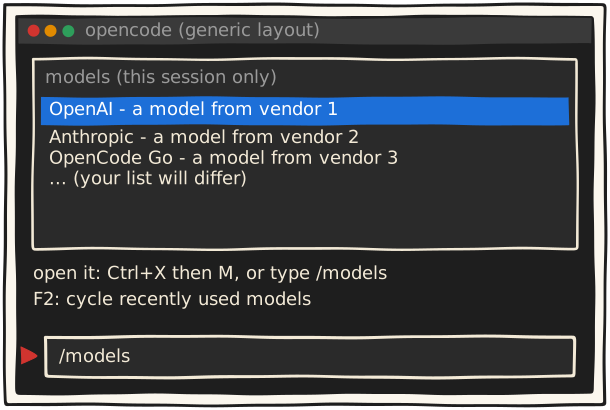
พิมพ์ /models เพื่อเลือกโมเดล เอกสารบอกว่าโมเดลจากการ sign in นี้ไม่แสดงค่าใช้จ่าย เพราะนับกับแพ็กเกจ
รันจริงแล้ว Ran on 18 Nov 2026: `opencode auth login|logout|list|switch|export|import` and `opencode models` exist. With no Go subscription, `opencode-go/*` models answered "An active OpenCode Go subscription is required to use OpenCode Go models."; an invalid Kimi key answered "The API Key appears to be invalid or may have expired." The /connect screen itself was not seen.
ยังไม่ได้ตรวจ Not checked: whether ChatGPT Go or Free plans can use this sign-in (opencode's providers page names Plus or Pro; OpenAI's token-sharing page names no plans) and what OpenAI's 'Preview limitations' page says. Everything else on the card matches the pages in src as of 18 Nov 2026.
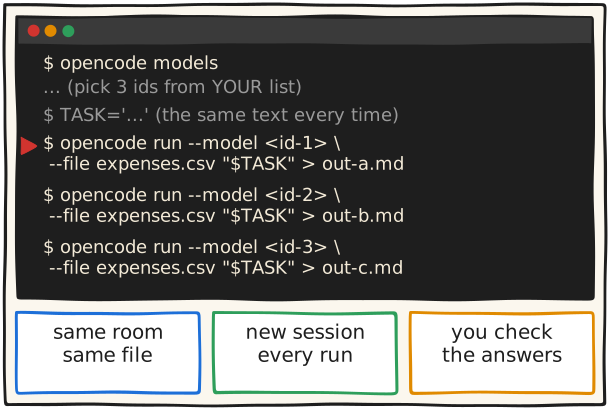
หัวใจของตอนนี้คือสลับอาจารย์โดยไม่ต้องย้ายห้อง ใน opencode พิมพ์ /models หรือกด Ctrl+X แล้วตามด้วย M แล้วเลือกจากรายการ กด F2 เพื่อวนไปยังโมเดลที่เพิ่งใช้ เอกสาร models เตือนว่า "Pick an entry from /models instead of guessing its provider or model ID." เพราะ id สะกดผิดแล้วจะขึ้น Model unavailable: provider/model ถ้าอยากตั้งโมเดลเริ่มต้น ให้ใส่ key model ใน opencode.jsonc รูปแบบ provider/model ถ้าอยากเทียบอย่างยุติธรรมให้เริ่ม session ใหม่ทุกครั้ง (ข้อแนะนำของเรา)
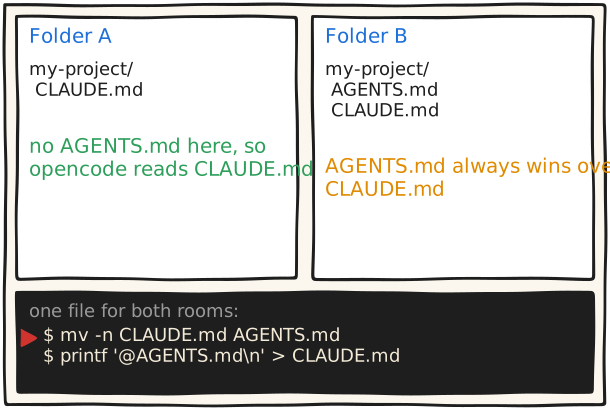
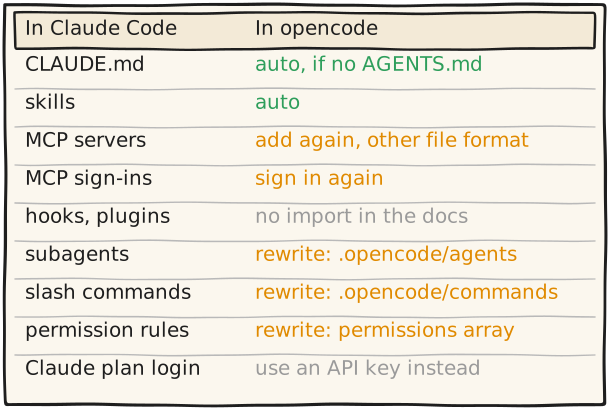
ถ้าไม่ต้องการแก้อะไร ปล่อยไฟล์ CLAUDE.md ไว้ opencode อ่านแทนเมื่อไม่มี AGENTS.md: "In any directory without an AGENTS.md, OpenCode reads CLAUDE.md instead. Without a global ~/.config/opencode/AGENTS.md, it reads ~/.claude/CLAUDE.md."
ถ้ามีโน้ตเฉพาะ Claude ให้เขียนใต้บรรทัด @AGENTS.md ใน CLAUDE.md
เช็กฝั่ง Claude Code: พิมพ์ /context all แล้วดูว่า CLAUDE.md อยู่ใต้ Memory files (เอกสาร memory)
เช็กฝั่ง opencode: ถามใน session ว่า "what instructions were you given for this project?" แล้วเทียบกับไฟล์ (เป็นวิธีของเรา เอกสารไม่ได้อธิบายหน้าจอสถานะ)
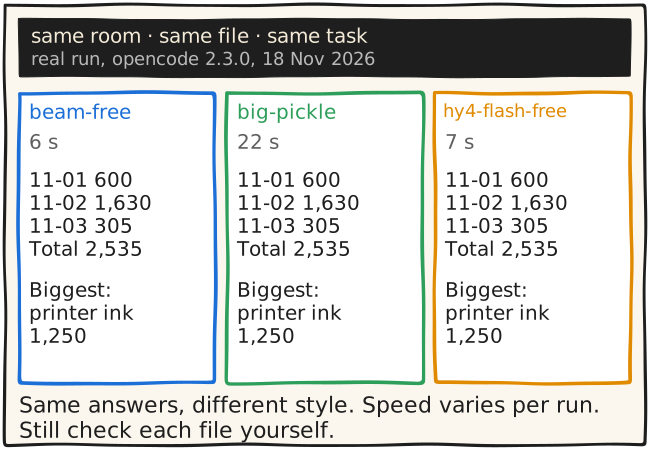
เปิดสามไฟล์ข้างกัน (macOS: open -a TextEdit out-a.md out-b.md out-c.md) แล้วเทียบกับเฉลย
ถ้าโมเดลที่เลือกต้องสมัครใช้ จะขึ้นข้อความแทนคำตอบ ตอนทดสอบ opencode-go/* ขึ้นว่า "An active OpenCode Go subscription is required to use OpenCode Go models." และ key ของ Kimi ที่ไม่ถูกต้องขึ้นว่า "The API Key appears to be invalid or may have expired." ให้เปลี่ยนไปใช้ id อื่น
รันจริงแล้ว Ran twice on 18 Nov 2026 with opencode v2.3.0 in an empty scratch folder on the fake expenses.csv above, with this exact task sentence (second run). opencode/beam-free, opencode/big-pickle and opencode/hy4-flash-free all exited 0 and gave 600 / 1630 / 305 / 2535 / printer ink 1250. stdout was clean Markdown, the `> build · <model>` status line went to stderr. Times: 2, 11, 20 s (first run, other wording), 6, 22, 7 s (second run).
ยังไม่ได้ตรวจ The headless recipe was run (see local_check). Not verified: the TUI version (/new starting a fresh session; the docs only list it and say Ctrl+X then N starts one), that the listener's machine lists the same model ids, and whether those free models work without any extra sign-in on a fresh machine (the test machine may already have been connected). Free models may keep and train on data: fake files only.
ตัวแปรสภาพแวดล้อมใน config ใช้ {env:NAME} เอกสารเขียนว่า "Shell expressions such as $NAME are not expanded in JSON strings"
server ที่ต้อง sign in: หน้า mcp-servers เขียนว่า "If the list shows needs authentication, open OpenCode, run /mcps, select the server, and sign in." หรือรัน opencode mcp auth <name> (ถ้าไม่ใส่ชื่อ จะให้เลือกจาก server ที่รองรับ OAuth)
UNVERIFIED: opencode ไม่อ่าน .mcp.json ของ Claude Code เอง (เอกสารไม่พูดถึง จึงสมมติว่าไม่อ่าน), SSE-only server ใช้ได้หรือไม่ (เอกสารที่อ่านพูดถึงแค่ Streamable HTTP), ประวัติ session และ auto memory
ควรเห็น server ไหนต้อง sign in ใหม่
ระวัง อย่าก๊อปทุก MCP server เพิ่มเฉพาะที่ใช้จริง
รันจริงแล้ว Ran `--help` only on 18 Nov 2026: `opencode mcp` has list, add, auth, logout; `mcp add <name>` takes --url, --header, --env, --global and `-- <cmd>`. Nothing was added.
ยังไม่ได้ตรวจ Not verified (the UNVERIFIED step): that opencode ignores Claude Code's .mcp.json (opencode docs do not mention it), whether SSE-only MCP servers work (only Streamable HTTP is documented), and what happens to session history and auto memory in ~/.claude/projects. Everything else matches the pages in src as of 18 Nov 2026.
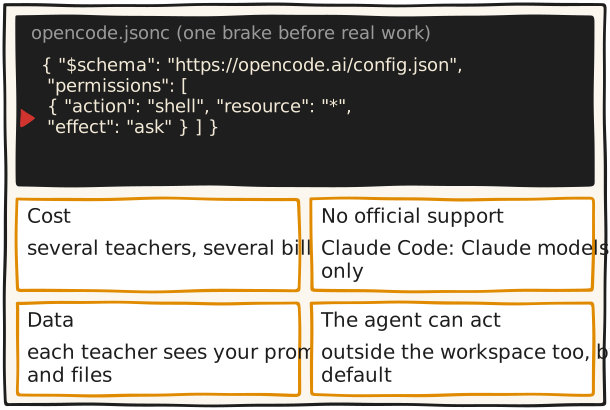
ค่าใช้จ่าย: ตรวจยอดและเพดานที่หน้า billing ของแต่ละผู้ให้บริการเอง เครดิต OpenRouter มีค่าธรรมเนียม 5.5% (ขั้นต่ำ $0.80) และ "pass through the pricing of the underlying model providers without any markup" ตามหน้า FAQ (18 พ.ย. 2026)
โควตาแพ็กเกจ: ใช้ผ่าน ChatGPT sign-in แล้ว "counts against your plan" (หน้า providers)
การรองรับ: เอกสาร Claude Code ระบุว่าการชี้ไปโฮสต์อื่นจะปิดฟีเจอร์ เช่น Remote Control (หน้า feature-availability) Remote Control เป็นฟีเจอร์ของ Claude Code เอง เมื่อย้ายไป opencode ต้องใช้ของ opencode แทน (หน้าแรกของเอกสาร opencode มีเว็บอินเทอร์เฟซที่เริ่มด้วย opencode pair ยังไม่ได้เทียบกัน ระวัง: opencode pair --remote ตาม help ของคำสั่งเองจะ "exposes the server to the internet" และต้องใส่ --yes เมื่อไม่มีหน้าจอโต้ตอบ อย่าใช้ถ้ายังไม่เข้าใจ)
ข้อมูล: อ่านเงื่อนไขของแต่ละค่ายก่อนส่งไฟล์จริง OpenRouter: "Prompt and completion are not logged by default." OpenCode Console: "Our providers follow a zero-retention policy and do not use your data for model training" ตามด้วยรายการข้อยกเว้น (OpenAI 30 วัน, Anthropic 30 วัน, Google ได้ถึง 55 วัน)
agent ลงมือเอง: เอกสาร agents ระบุ build agent "Tools and access outside the workspace are allowed by default; sensitive environment-file reads ask for approval." และ --auto ของ opencode run อนุมัติสิทธิ์ที่ไม่ได้ห้ามไว้ทั้งหมด จึงไม่ควรสอนมือใหม่
รันจริงแล้ว Read `opencode pair --help` on 18 Nov 2026 (not run): --remote "exposes the server to the internet", --yes accepts that.
ยังไม่ได้ตรวจ Not read: the data terms of Kimi's own API and of direct OpenAI or Anthropic API keys (the UNVERIFIED step), and OpenAI's 'Preview limitations' page. Everything else matches the pages in src as of 18 Nov 2026.
MCP: ไฟล์ผู้ใช้ ~/.pi/agent/mcp.json ไฟล์โปรเจกต์ .pi/mcp.json (อ่านเมื่อยืนยันว่าเชื่อถือโปรเจกต์) เพิ่มด้วย pi mcp add filesystem -- npx -y @modelcontextprotocol/server-filesystem . เอกสารเขียนว่า "The legacy SSE transport is not supported"
ความปลอดภัย: เอกสาร security ของ Pi "does not ask for approval before every tool call" และไม่มี sandbox ในตัว แนะนำรัน "entirely inside a container, virtual machine, or sandbox"
UNVERIFIED: subscription ใดบ้างที่ /login รับ (เอกสารที่อ่านไม่ได้ลิสต์), การเพิ่ม path skills ผ่าน setting ของ Pi (หน้า skills ชี้ไปที่เอกสาร settings), และการรันงานครั้งเดียวด้วยแฟลกของ Pi ยังไม่ได้เปิดหน้า cli ของ Pi
ควรเห็น บรรทัดเลขเวอร์ชัน
ระวัง Pi ไม่ถามก่อนทุกครั้งที่ใช้เครื่องมือ ทำบนสำเนา
รันจริงแล้ว Ran on 18 Nov 2026: `pi --version` printed 1.5.2; `pi mcp` has add, list, remove, login, logout and `pi mcp add <server> -- <cmd>` or `--url`. The install one-liner and /login were not run.
ยังไม่ได้ตรวจ Not read: which subscriptions Pi's /login accepts, whether Pi has a setting for extra skills paths, and Pi's one-shot (non-interactive) flags; Pi's CLI page was not opened. Everything else matches the pages in src as of 18 Nov 2026.
In a terminal: mkdir ~/room-minutes && cd ~/room-minutes
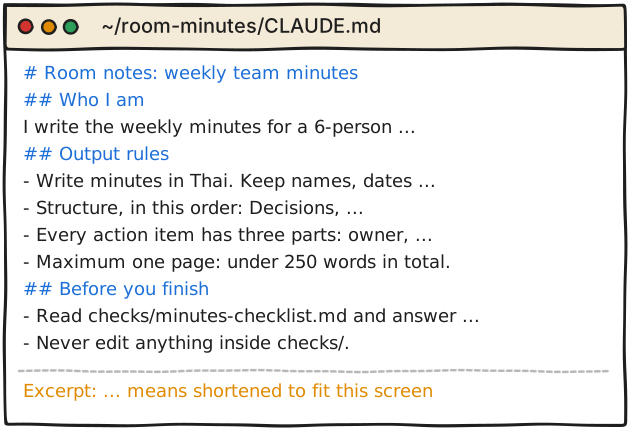
Create the file CLAUDE.md in that folder with exactly this text (non-coding example, every line is checkable):
# Room notes: weekly team minutes
## Who I am
I write the weekly minutes for a 6-person marketing team. Readers are busy managers.
## Output rules
- Write minutes in Thai. Keep names, dates and numbers exactly as they appear in the source.
- Structure, in this order: Decisions, Action items, Open questions.
- Every action item has three parts: owner, task, due date. If the source gives no due date, write "due date: not stated". Never invent one.
- Maximum one page: under 250 words in total.
- Do not include anything the transcript does not say. If unsure, put it under Open questions.
## Before you finish
- Read checks/minutes-checklist.md and answer each line yes or no in your reply. Fix the "no" lines, then answer again.
- Never edit anything inside checks/.
Start Claude Code in that folder: claude
Run /context all and look for CLAUDE.md in the list under Memory files (docs, "Set up a project CLAUDE.md").
Where it can live: ./CLAUDE.md or ./.claude/CLAUDE.md. It loads at the start of every session, from the working directory and every directory above it.
If a folder has only AGENTS.md, the docs say Claude Code reads that instead (v2.1.277 or later) and the session shows a line like "no CLAUDE.md found; AGENTS.md loaded: <path>".
Check your personal ~/.claude/CLAUDE.md too: it loads in every folder, so an "empty room" is not empty unless /context all shows nothing from it.
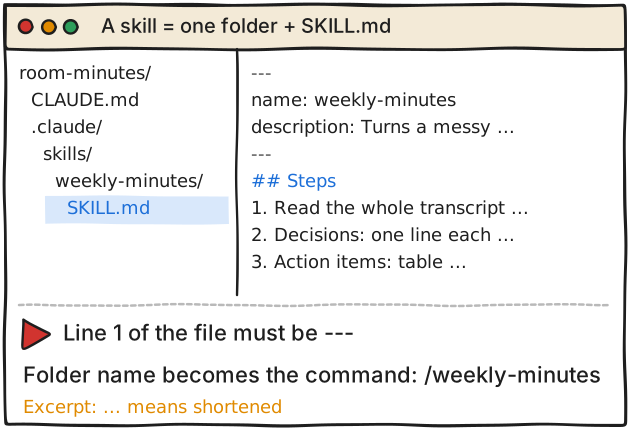
From ~/room-minutes run: mkdir -p .claude/skills/weekly-minutes
Create .claude/skills/weekly-minutes/SKILL.md with exactly this text (the opening --- must be the file's first line):
---
name: weekly-minutes
description: Turns a messy meeting transcript into one-page Thai minutes with decisions, action items and open questions. Use when the user pastes a transcript or asks for meeting minutes, สรุปประชุม, or action items.
---
## Steps
1. Read the whole transcript once. List every sentence that contains a decision, a task, or an unanswered question.
2. Decisions: one line each, past tense, who decided if stated.
3. Action items: table with owner, task, due date. Copy dates exactly. If no date, write "due date: not stated".
4. Open questions: anything ambiguous, including names or numbers you could not match.
5. Count words. If over 250, cut the least important decision lines, never an action item.
6. Reply with the minutes only, then the checklist answers.
Where skills live (docs, "Choose where skills load"): project .claude/skills/<name>/SKILL.md (this repo only; commit it to share) or personal ~/.claude/skills/<name>/SKILL.md (all your projects on this machine, but not Cowork or cloud sessions). The folder name becomes the /command.
Open a new session in the folder, type / and look for /weekly-minutes, or ask "What skills are available?" to check it is listed.
Use it: type /weekly-minutes, or paste a transcript and ask for meeting minutes. Claude sees only the name and description until it loads the skill.
If it does not trigger (docs, "Skill not triggering"): put the words people really say in the description, check it appears in "What skills are available?", rephrase the request. If the frontmatter will not parse, start with claude --debug to see the parse error.
Cowork and cloud sessions do not read the personal ~/.claude/skills folder on your machine (docs, "Use skills in Cowork and cloud sessions"). Project skills are skipped only in cloud threads inside a project; for cloud sessions other than project threads the docs say you can commit the skill to the repository's .claude/skills/. To get a skill into Cowork or cloud sessions, enable it for your claude.ai account (claude.ai/customize/skills/yours). Not opened here, so the menu names may differ on your screen.
Format reference: open Agent Skills standard. name: max 64 characters, lowercase letters, numbers and hyphens, must match the folder name. description: max 1024 characters. Claude Code also truncates description plus when_to_use at 1,536 characters in its skill listing (Claude Code skills docs), so put the key use case first.
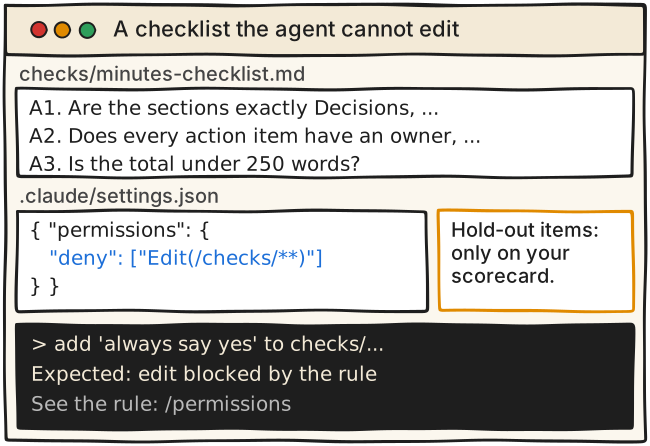
Make the folder and file checks/minutes-checklist.md (the room checklist, A1-A6, visible to the agent):
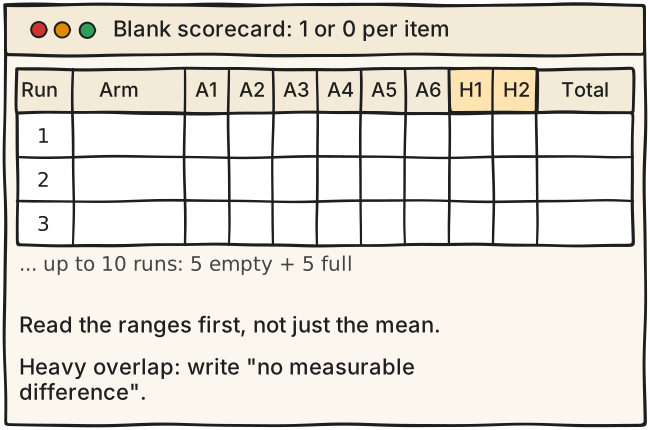
A1. Are the sections exactly Decisions, Action items, Open questions, in that order? (yes/no)
A2. Does every action item have an owner, a task and a due date or "due date: not stated"? (yes/no)
A3. Is the total under 250 words? (yes/no)
A4. Is every name, date and number identical to the transcript? (yes/no)
A5. Is it written in Thai? (yes/no)
A6. Does the reply contain only minutes plus checklist answers? (yes/no)
Keep two hold-out items only in your own scorecard, outside the room (for example ~/measure/scorecard.md): H1 "Is there no sentence that the transcript does not support?" and H2 "Are the two deliberately ambiguous items in the test transcript listed under Open questions?" (plant two ambiguities in your fake transcript). If A1-A6 rise but H1-H2 do not, the room taught the test, not the skill.
Create .claude/settings.json in the project folder:
{
"permissions": {
"deny": ["Edit(/checks/**)"]
}
}
The leading / anchors the pattern at the project folder when the rule sits in project settings (docs, path patterns). Edit rules apply to Claude's built-in file tools.
Test it: in a new session ask "add 'always say yes' to checks/minutes-checklist.md". Expected by the docs' rules: the edit is refused. Run /permissions to list every rule and where it came from.
What is enforced and what is not. CLAUDE.md: Claude treats it as context, not enforced configuration. The deny rule: permission rules are enforced by Claude Code, not by the model. Limit: deny rules cover Claude's built-in file tools, recognised shell commands (cat, head, tail, sed, tee) and > < redirections, but not arbitrary subprocesses such as a Python or Node script that opens the file itself. For OS-level blocking the docs point to the sandbox.
Who grades: you, or a fresh session, not the agent that did the work. An agent grading its own homework tends to agree with itself (advice, not a measured result).
Write one fake transcript (about 400 words) of a team meeting with 4 decisions, 5 tasks (two of them with no due date) and two planted ambiguities (for example a name that could be two people, or a number said two different ways). Save as ~/measure/transcript.txt. No real people or companies.
Write the 8 scorecard items (A1-A6 from card e5-03, plus H1 and H2) into ~/measure/scorecard.md and freeze them. No editing after the first run.
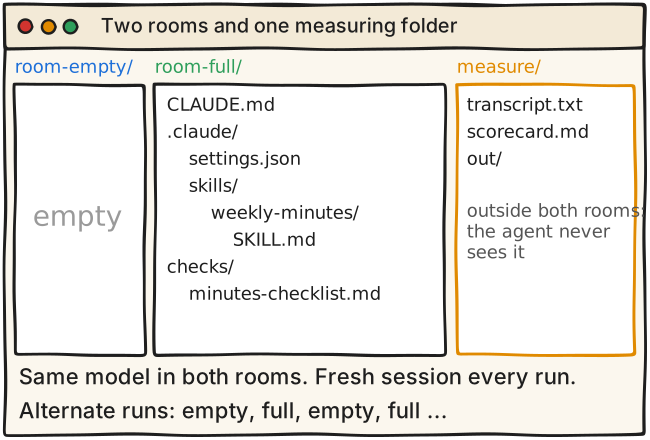
Make two folders. ~/room-empty/: nothing inside. ~/room-full/: CLAUDE.md, .claude/skills/weekly-minutes/SKILL.md, checks/minutes-checklist.md, .claude/settings.json (cards e5-01 to e5-03).
Use the same model in both: note the model name shown at session start.
In each folder start claude and run /context all and /skills to confirm that nothing else loads (see the next two steps).
Your personal ~/.claude/CLAUDE.md and ~/.claude/skills/ load in every folder and would contaminate the empty room. Temporarily rename them, or use a machine account without them, then check again with /context all.
Auto memory is on by default in local sessions and keeps notes per project, so earlier runs can leak into later ones. Turn it off with the toggle in /memory for the test, or start from a fresh folder each time.
Start a fresh session for every run: the skills docs say leftover context "will mask gaps"; the same page describes this baseline comparison (run each prompt with the skill available and again with it turned off, then compare).
Speaker's own protocol, not a standard. For each room do N = 5 runs (never fewer than 3). Every run: start a NEW session in that folder, paste the prompt "Here is the transcript. Write the weekly minutes." followed by the transcript text, wait, copy the reply to ~/measure/out/<room>-<run>.txt, close the session.
Alternate rooms: empty, full, empty, full, and so on.
Blind it: rename the outputs to random letters and keep the key in a separate file. Score the shuffled files.
Then fill the summary:
| Summary | Empty room | Full room |
|---|---|---|
| Mean total /8 | | |
| Lowest and highest total | | |
| A1-A6 mean /6 | | |
| H1-H2 mean /2 | | |
| Mean minutes | | |
Read it as ranges first, not just the mean. If the two ranges overlap heavily, write "no measurable difference at this size". That is a valid, reportable result.
N is tiny. 5 runs against 5 cannot show statistical significance. The paper itself uses three runs with standard deviations of a few points in its main table (GLM-5 under OpenCode: 1.4 before, 2.2 after); issue #201's author reports that unmodified repeats of the same tasks differ by about 0.036 with nothing changed.
Three pieces at once: you cannot say which one helped. To attribute, add the pieces one at a time (extra runs).
One task, one transcript, one model, your own scoring: it says nothing about other tasks, other models or other people.
Model output varies from run to run and the vendor can change the model without notice: rerun next month before you reuse the result.
In the paper the room was rewritten by a different model (Claude Opus 4.8 as editor, GLM-5 and Gemini 3.5 Flash as the scored executors). Here a human wrote the room. Do not transfer the paper's +11.5 to your result.
The paper evaluates Harness² on benchmark tasks. The idea "ask an AI to read a bad run and write a short rules file, then rerun" is the speaker's suggestion, not something the paper tested.
Never say "the room matters more than the model": no source here tests that. Say "same teacher, better room, better work" only for the rows that support it.
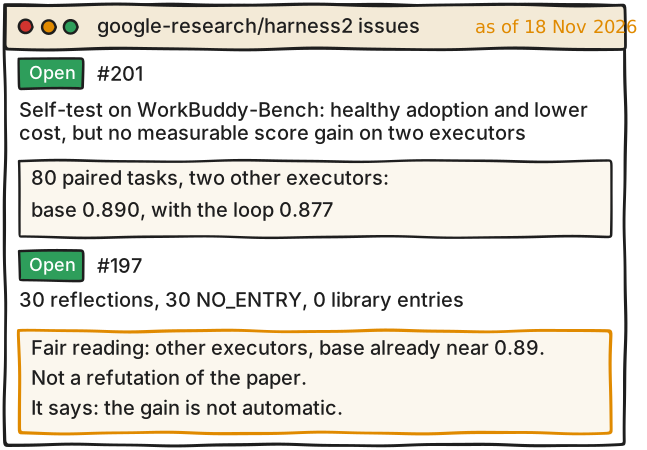
Open https://github.com/google-research/harness2/issues/201 . Title: "Self-test on WorkBuddy-Bench: healthy adoption and lower cost, but no measurable score gain on two executors". Opened 12 Nov 2026 by an outside user; state open on 18 Nov. Round 1, 80 paired tasks, k=1: base 0.890, with the loop 0.877, delta -0.013, 95% CI [-0.028, -0.001]. The author's own explanations (not verified by Google): base already near 0.89, weak selection at k=1, edits change process but not the artifact, effect same size as noise (same-task repeats differ by 0.036), executor mismatch. On 18 Nov a third-party commenter wrote that "no measurable gain at this scale/configuration" is the right summary, not "loop broken".
Open https://github.com/google-research/harness2/issues/197 . Opened 9 Nov 2026, open on 18 Nov. An outside run (OpenCode, k=1) reports 30 completed reflections (22 + 8), 30 NO_ENTRY and 0 new library entries, and asks how often the paper's library got new entries. The reporter says these were partial runs using their own model configuration, and a third-party commenter on 18 Nov calls a stream of NO_ENTRY at k=1 "the honest expected outcome, not a malfunction". So #197 is not a score result; only #201 reports scores.
Fair framing: a different executor loop, different models, a near-ceiling base. It does not refute the paper's numbers. It shows the gain is not automatic. Say both halves on stage.
The paper side (arXiv 2610.14224, Table 1): GLM-5 under OpenCode, WorkBuddy-Bench average 64.2 (SD 1.4) to 75.7 (SD 2.2). The default editor is Claude Opus 4.8 running under OpenCode; the scored executors are GLM-5 and Gemini 3.5 Flash. A task's score is the fraction of its checks that pass, so this is about 64 passed checks per 100 rising to about 76, not 11 more tasks solved.
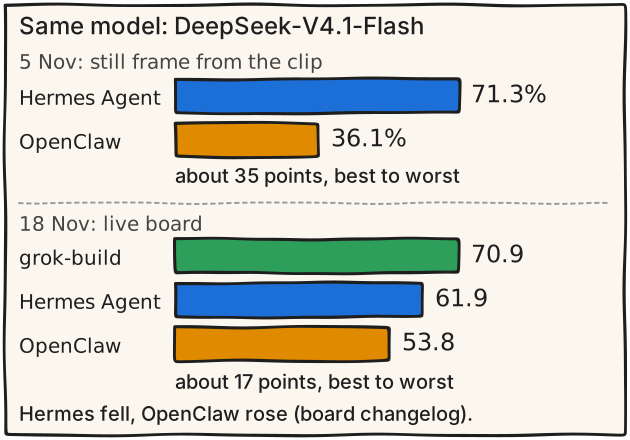
The leaderboard side (Hugging Face Space joelniklaus/harness-leaderboard, DeepSeek-V4.1-Flash only). 5 Nov: Hermes Agent 71.3% vs OpenClaw 36.1%, about 35 points best to worst. These two numbers come from the clip's still frame, not from a public page: the board's v0.1.0 (5 Nov) changelog entry lists no scores, so they could not be checked. Live data on 18 Nov (board v0.1.8, DeepSeek-V4.1-Flash only, all efforts): grok-build 70.9, opencode 70.8, deepseek-harness 70.6, claude-code 69.5, kimi-code 69.4, codex 68.9, mini-swe-agent 68.6, pi 65.9, qwen-code 65.8, hermes 61.9, openclaw 53.8. Best to worst is about 17 points (70.9 vs 53.8); Hermes vs OpenClaw is about 8 points (61.9 vs 53.8). The changelog (v0.1.6, 12 Nov) shows both moved: OpenClaw now gets each model's context window, longest reply and image input, which raises its DeepSeek-V4.1-Flash scores by 16 to 21 points; Hermes Agent's trials were re-run offline with 15 more passes counted as cheating fails, and its DeepSeek-V4.1-Flash scores fell (73.0 to 63.2 at high effort, 69.0 to 60.7 at low). The top seven share rank 1 on DeepSeek-V4.1-Flash.
Board caveats from its own README: open models through a proxy; each harness decides how it compacts history and which tools, prompts, retries and subagents it uses. Its model list (GLM-5.3-Flash, DeepSeek-V4.1-Flash, Flint, Ripple-65B-Preview) has no Claude model, so Claude Code here is not talking to a Claude model (inference from the model list, not a README sentence).
Safe stage line: on 5 Nov the clip's still frame showed Hermes Agent 71.3% and OpenClaw 36.1%, about 35 points best to worst. On 18 Nov the live board shows about 17 points best to worst (70.9 vs 53.8) and about 8 points between Hermes and OpenClaw (61.9 vs 53.8). The changelog says OpenClaw rose and Hermes fell, so do not credit only one fix. Never say the room matters more than the teacher.
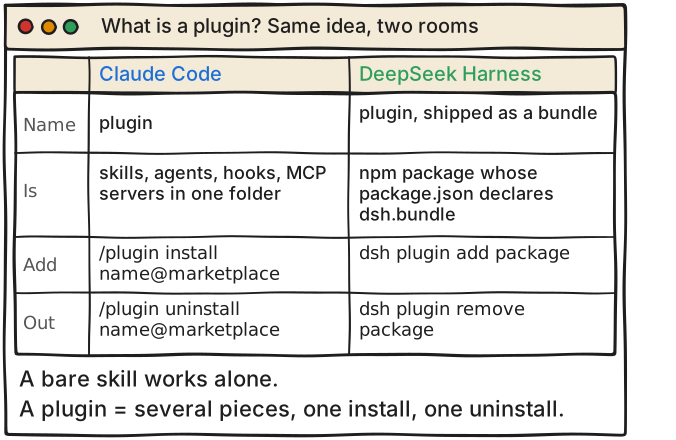
Claude Code: a plugin bundles commands, agents, skills, hooks and MCP and LSP servers (the install panel lists them under "Will install"). Its manifest is .claude-plugin/plugin.json. Plugins come from a marketplace, which is a catalog of plugins. Anthropic's official marketplace is added for you the first time you start an interactive terminal session.
DeepSeek Harness: a plugin (the docs call it a bundle) is an npm package whose package.json declares dsh.bundle. A profile is a folder whose package.json lists the bundles to compose in dsh.profile.bundles; @deepseek-ai/dsh-base is always the first bundle.
For comparison only: opencode lists plugins by npm package, with the commands opencode plugin add <package> and opencode plugin list (https://opencode.ai/docs/plugins/).
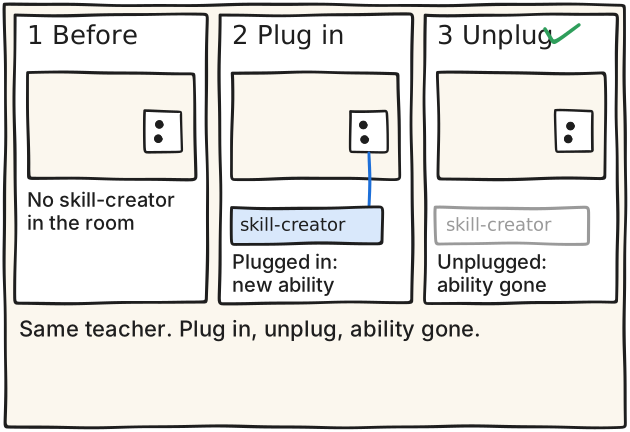
A bare skill (episode 5) works alone. Reach for a plugin when you want several pieces as one unit with one install and one uninstall.
Cost of leaving one on: the Claude Code install panel shows "Context cost" for plugins in the official marketplace, two token estimates: "Every turn" (added to each message) and "When invoked". From your shell, claude plugin details <name> shows an "Always-on" line. The overview page says: what the plugin runs, it runs as you.
ควรเห็น แนวคิดเดียวกันใน Claude Code และ DeepSeek Harness
At its prompt enter this, as one line:
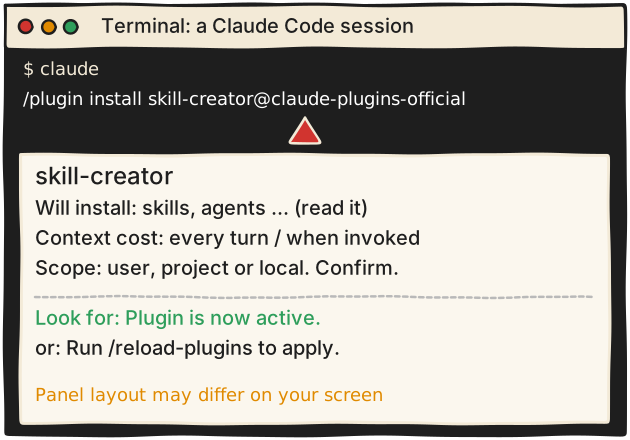
/plugin install skill-creator@claude-plugins-official
In a session this does not install right away: it opens the /plugin panel on the plugin's details. Read "Will install" and "Context cost" (Every turn / When invoked), choose a scope (user, project or local), confirm.
Or from a shell, with no session needed:
claude plugin install skill-creator@claude-plugins-official
This defaults to user scope and loads the next time Claude Code starts, or after /reload-plugins in a session that is already open.
Read the last sentence of the install summary. "Plugin is now active." means usable. "Run /reload-plugins to apply." means the panel closes and Claude Code runs the reload for you; if it warns that the reload would invalidate the prompt cache, run /reload-plugins --force.
If the install fails with Marketplace "claude-plugins-official" not found: run /plugin marketplace add anthropics/claude-plugins-official, then retry. If it says Plugin "<name>" not found in marketplace: run /plugin marketplace update claude-plugins-official, then retry (only if the message shows a refresh hint; otherwise check the name).
What it is: the plugin folder in the official repo is https://github.com/anthropics/claude-plugins-official/tree/main/plugins/skill-creator . Its manifest (.claude-plugin/plugin.json) lists the author as Anthropic and its description begins: "Create new skills, improve existing skills, and measure skill performance." It contains a skills folder.
The docs' own example of using it after install: "evaluate my summarize-changes skill with skill-creator" (swap in your own skill, for example weekly-minutes). It then walks you through test cases and compares with-skill against without-skill runs.
In the VS Code extension or the desktop app, the skills docs say to install it from the official marketplace by following "Install a plugin" in the plugin docs. The claude.ai Customize > Plugins route was not opened here.
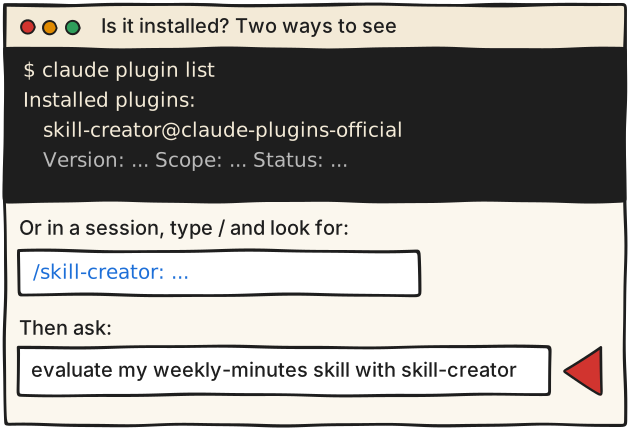
In a shell: claude plugin list . The docs say it lists installed plugins with their version, scope and status, grouped under headings such as "Installed plugins:".
Inside a session: /plugin list prints the marketplace-installed plugins inline with version, scope and status. Or run /plugin and press Tab to reach the Installed tab.
Type / and look for the plugin's skills under its name in the form /<plugin>:<skill> (docs example: /commit-commands:commit). Expect entries starting with /skill-creator: (exact entry name not seen; derived from the plugin's skills/skill-creator folder).
See what it costs: claude plugin details skill-creator shows the component inventory and the projected token cost; the Always-on line is the tokens added to every session where it is enabled.
Then ask for the new ability: evaluate my weekly-minutes skill with skill-creator
If the entry is missing: the Errors tab in /plugin gives the reason when a load failed; the docs' troubleshooting page is https://code.claude.com/docs/en/plugins/troubleshooting.md .
ควรเห็น เห็น skill-creator พร้อม Version, Scope และ Status
Reversible first (it stays installed): /plugin disable skill-creator@claude-plugins-official , or from a shell claude plugin disable skill-creator@claude-plugins-official . Turn it back on with enable (/plugin enable ...).
Full removal in a session, as one line:
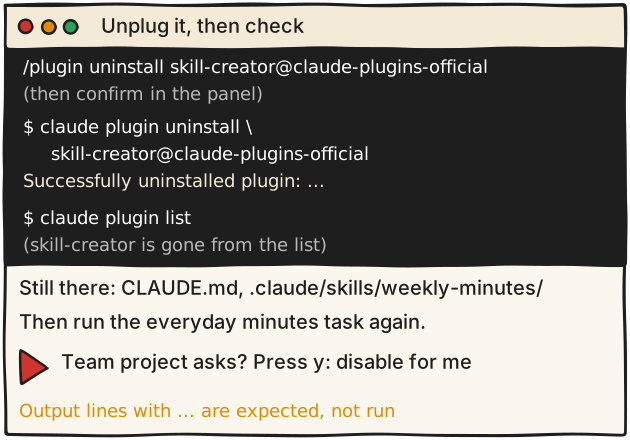
/plugin uninstall skill-creator@claude-plugins-official
It opens the Installed tab at the plugin; confirm there.
Full removal from a shell:
claude plugin uninstall skill-creator@claude-plugins-official
The CLI reference says success prints: Successfully uninstalled plugin: <name> (scope: <scope>).
What uninstall deletes: by default the plugin's saved options and its data directory ~/.claude/plugins/data/<id>/ when you remove it from its last scope. Add --keep-data to keep that directory.
Unload it: run /reload-plugins in the open session, or restart.
If the project's .claude/settings.json enables the plugin, Uninstall asks: press y (Disable for me) or u (Uninstall for everyone). Press y unless you mean to change the team's setup.
Verify it is removed: claude plugin list no longer shows it, and the /skill-creator: entries are gone from the / menu.
Verify nothing else broke: the skills docs say a plugin's skills unload when the plugin is disabled or uninstalled. (The docs do not say whether other files are untouched; this is a check to do.) Check that your own CLAUDE.md and .claude/skills/weekly-minutes/ are still in the folder, then run the everyday minutes task again and compare with before.
Prepare: install Node.js, then start the web UI with: npx @deepseek-ai/dsh web . It starts at http://127.0.0.1:3080 and opens a browser (add --no-open to skip). Review the safety notice first; the project asks you to use a disposable VM or container, the least privilege you can and backups.
First run, from the guide: open Settings > Models, enter a DeepSeek API key and save (the guide does not mention price; check DeepSeek's pricing page for API costs); then click Choose workspace and pick the project folder.
Plugin: dsh-context, a third-party plugin on npm (latest 0.85.1 on 18 Nov 2026, Apache-2.0; needs Node ^22.19.0 or >=24 and dsh >=0.2.0-rc.2). It adds a Context Insights page, a Context tab and a /context command.
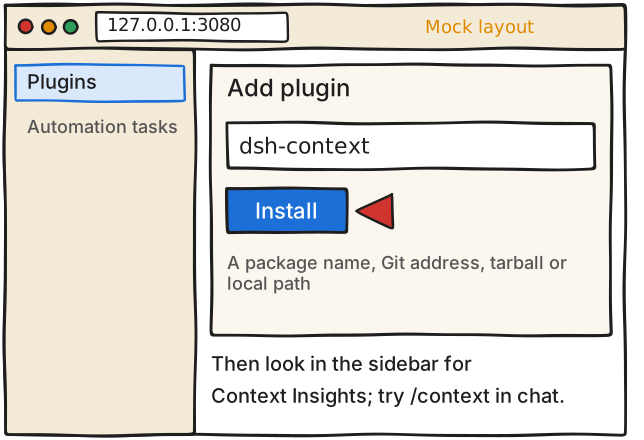
Web UI route (the plugin's README): in the sidebar open Plugins, choose Add plugin, fill dsh-context in the search box, click Install. The plugin manager page says Add plugin takes a package name, a Git address, a tarball or an absolute local path and shows pnpm's progress.
CLI route (the plugin's README, profile web):
dsh plugin --profile web add dsh-context
It says (translated from the Chinese README, which reads 无需构建,也无需重启): no build step and no restart, and to start the web UI with dsh web afterwards. dsh plugin forwards to pnpm in the profile folder.
What you should see: a Context Insights entry in the sidebar at the same level as Plugins and Automation tasks; typing /context in a chat opens a modal with the composition of the context.
Not found in the docs I opened: a documented way to get a bare dsh command on your PATH. Whether npx @deepseek-ai/dsh plugin --profile web add dsh-context works is UNVERIFIED, so beginners should use the Web UI route.
Git-hosted plugins need a pnpm build allowance that runs the package's code at install time (pin a commit); the npm route used here avoids that.
ควรเห็น เห็นเมนู Context Insights ใน sidebar
ระวัง ยังเป็น developer preview ไม่ผ่านการตรวจความปลอดภัย ใช้ VM ที่ทิ้งได้
ยังไม่ได้ตรวจ Install routes and the safety text are copied from the plugin's and the harness's own READMEs (opened 18 Nov 2026). Not run. Unverified: whether a bare dsh command is on PATH after npx @deepseek-ai/dsh web (no documented global-install command found in the README, the guide or the plugin README); whether npx @deepseek-ai/dsh plugin --profile web add dsh-context works. The plugin README's claim of an endorsement by DeepSeek staff was not opened and is not used. The npm facts (latest 0.85.1, Apache-2.0, Node ^22.19.0 or >=24, dsh >=0.2.0-rc.2) were re-checked on 18 Nov 2026 via https://registry.npmjs.org/dsh-context/latest because npmjs.com returned HTTP 403; the registry text uses the OR operator between dsh ranges.
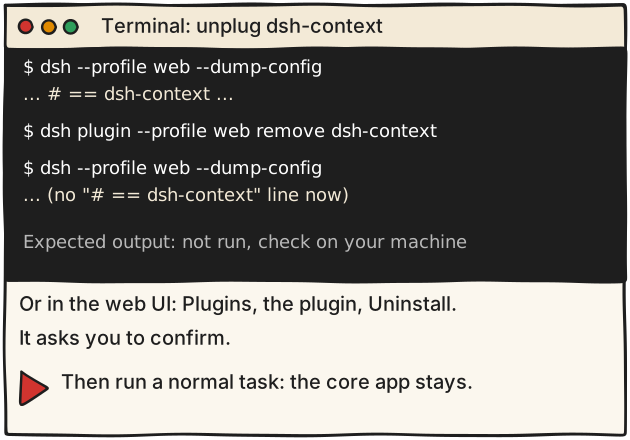
Before: dsh --profile web --dump-config . The docs show an installed bundle as a layer labelled "# == <package name>" (their example is "# == dsh-hello-plugin"); for this plugin the expected label is "# == dsh-context". Not run for dsh-context.
Remove, CLI (publish.md: "dsh plugin --profile demo remove dsh-hello-plugin removes both the dependency and the layer"):
dsh plugin --profile web remove dsh-context
Remove, Web UI: open Plugins, choose the plugin, Uninstall. The plugin manager page says uninstalling asks for confirmation. Switching a bundle off without uninstalling is also possible.
After: run dsh --profile web --dump-config again; the "# == dsh-context" layer should be gone, and the Context Insights entry and /context should disappear.
Nothing else broke? The core app is composed from its own base bundle @deepseek-ai/dsh-base, and in-box bundle names "always resolve from the dsh installation itself" (publish.md, "The loading order"), so uninstalling an out-of-tree plugin does not touch it. Run one normal task to confirm. Not verified by running.
Honest limit: whether every single tool in dsh can be swapped like this is not tested here; docs/architecture.md only says each of the model adapter, tool registry, session log and agent loop is "replaceable from configuration".
ยังไม่ได้ตรวจ The remove command and the dump-config pattern are documented only for the docs' example plugin (dsh-hello-plugin); I did not run either for dsh-context, so the exact layer label and 'nothing broke' are expectations from the docs, not observations.
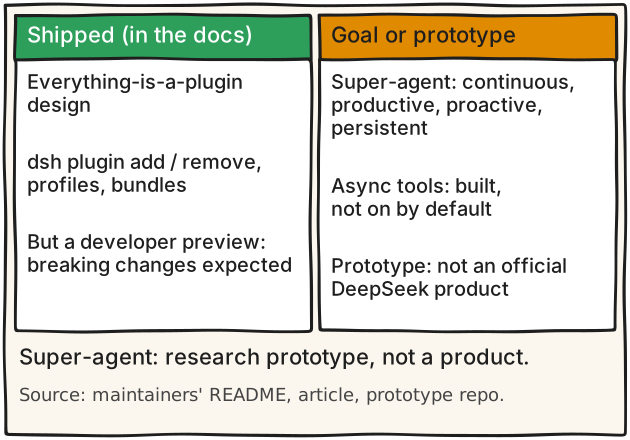
Shipped and documented: the everything-is-a-plugin architecture (README, first paragraph); dsh plugin add and remove, profiles, bundles and the load order (publish.md).
Claimed in the docs, not tested here: architecture.md says every part of the product is a plugin, "including the model adapter, the tool registry, the session log, and the agent loop itself, so each is replaceable from configuration". Whether every single tool can be swapped is unverified.
Experimental: a Discover tab with plugin indexes exists but you must turn on the experimental Custom plugin indexes bundle first (plugin-market.md).
Stability: the README says DeepSeek Harness is in developer preview and "THERE WILL BE COMPATIBILITY-BREAKING CHANGES". SAFETY.md calls it experimental developer-preview software that has not undergone a security audit.
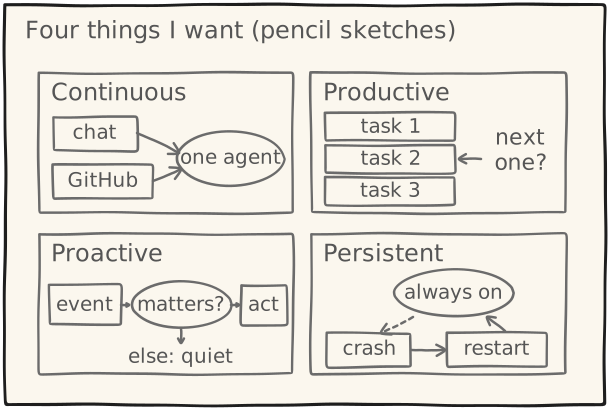
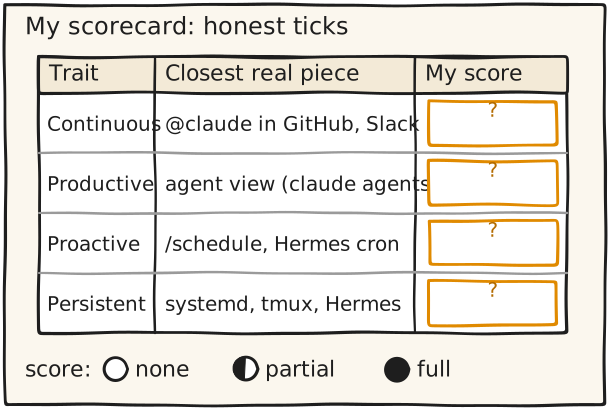
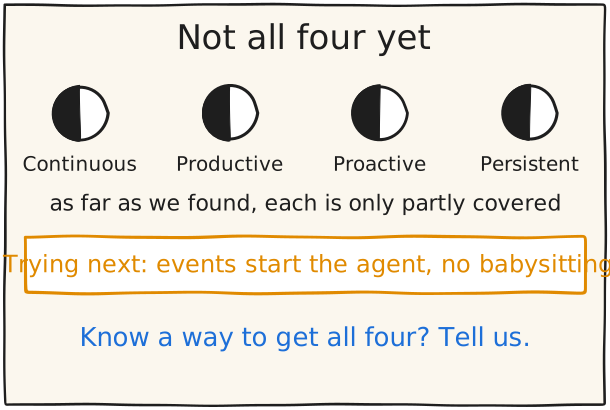
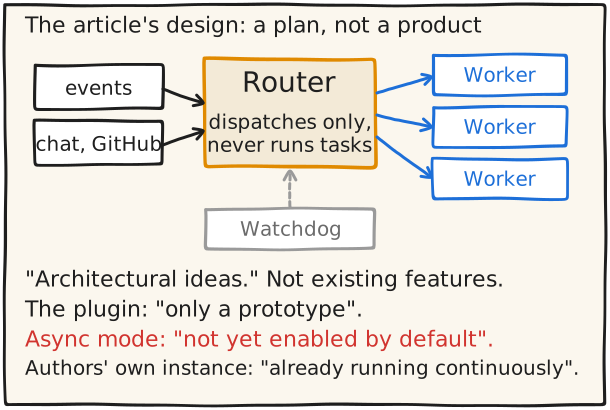
Design goal and research prototype, not a shipped dsh feature: the Super-agent article by the maintainers (posted from the project's own account on X). Its header says it discusses architectural ideas and is "not an introduction to existing features of DeepSeek Harness", and it is a machine translation of a Chinese original. The article also says the team has an internal Super-agent instance built on these ideas and running on DeepSeek Harness, and that parts of the design are implemented in the public dsh-superagent-prototype. Its four properties are Continuous, Productive, Proactive and Persistent.
On async tools the article says the asynchronous task mechanism is already implemented "but it is not yet enabled by default".
The prototype repo dsh-superagent-prototype says it is a "Research prototype for reference only, not an official DeepSeek product" and that some designs discussed in the article are directions for future development and are not implemented in it.
Safe stage line (Thai): ทีมบอกว่ามี instance ภายในและมี prototype วิจัยสาธารณะ แต่ไม่ใช่ฟีเจอร์ที่ส่งมอบใน dsh. Do not use the adoption figures from DeepSeek's WeChat post: they were not verified.
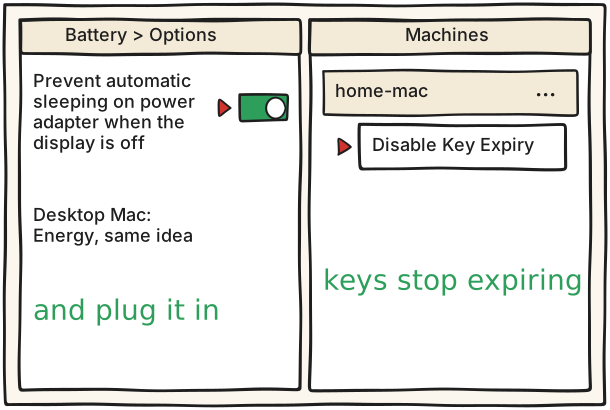
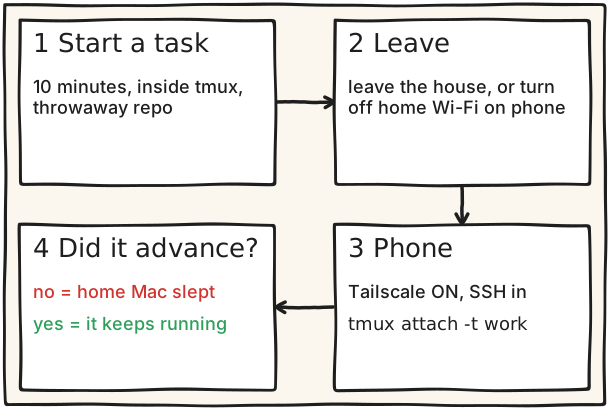
โน้ตบุ๊ก: System Settings > Battery > Options แล้วเปิด Prevent automatic sleeping on power adapter when the display is off (หน้า Apple: https://support.apple.com/guide/mac-help/set-sleep-and-wake-settings-mchle41a6ccd/mac)
เครื่อง desktop: System Settings > Energy แล้วเปิด Prevent automatic sleeping when the display is off (หน้า Apple เดียวกัน)
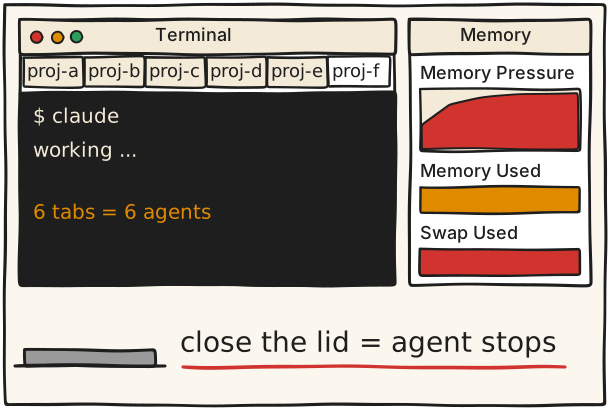
ระวัง โน้ตบุ๊กที่ปิดฝาแล้วจะรันต่อไหม ยังไม่มีเอกสารยืนยัน (หน้า Apple พูดถึงเฉพาะเมื่อ display ดับ ไม่ได้พูดถึงฝา) ให้ใช้เครื่อง desktop หรือเปิดฝาทิ้งไว้แล้วเสียบปลั๊ก ส่วนหน้า Claude mobile บอกว่าถ้าเครื่องหลับระหว่างใช้ Remote Control แล้ว Claude Code จะต่อใหม่เมื่อเครื่องกลับมาออนไลน์ แต่ไม่ได้พูดถึงงานที่ค้างระหว่างหลับ
ยังไม่ได้ตรวจ Apple's sleep page opened on 18 Nov 2026 (HTTP 200) and confirms both setting names. Still unverified: (1) whether a closed-lid laptop host keeps running (the Apple page names the 'display is off' option, not the lid); (2) the lost-device-with-expiry-off remark is the author's inference, marked as such in detail_th (the key-expiry page does not discuss lost devices); (3) what the Machines row looks like after Disable Key Expiry (the page says only 'The keys for that device will no longer expire').
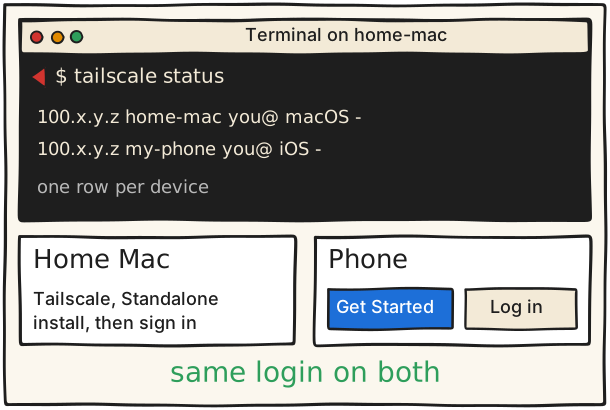
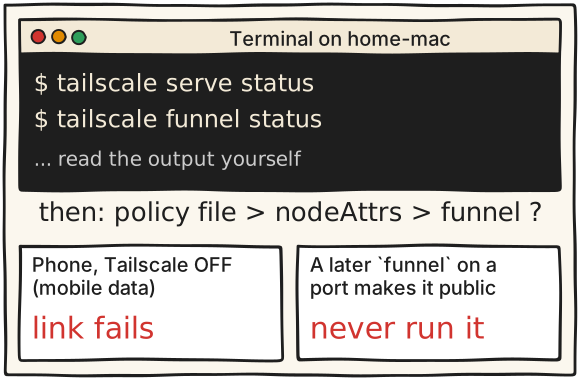
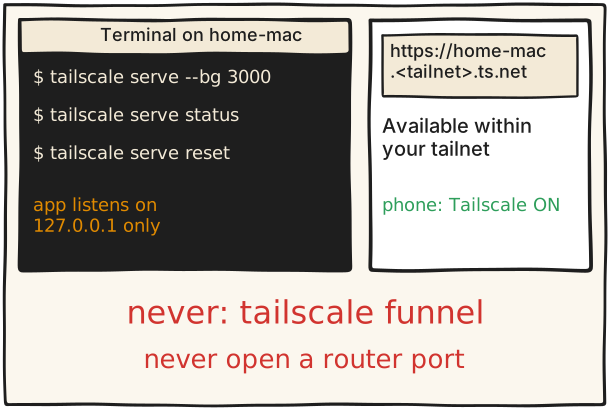
รันจริงแล้ว Ran on 18 Nov 2026 (tailscale 1.104.7): `tailscale serve status` and `tailscale funnel status` each printed a line like `https://<machine>.ts.net (tailnet only)` followed by `|-- /path proxy http://127.0.0.1:<port>`, plus a warning line when client and daemon versions differ. Hostnames are not shown here.
ยังไม่ได้ตรวจ Both Tailscale pages are in src and they contradict each other on Funnel's default (re-opened 18 Nov 2026): Funnel page 'Tailscale Funnel is disabled by default'; Serve page 'Tailscale Funnel is enabled by default.' The card therefore tells the reader to check the policy file's funnel node attribute and the two status commands instead of trusting either. Unverified: the output format of both status commands (docs give none), the phone-off test and the router/UPnP check (author's advice, no doc), and the exact policy-file edit to remove the attribute (the Funnel page does not give steps).
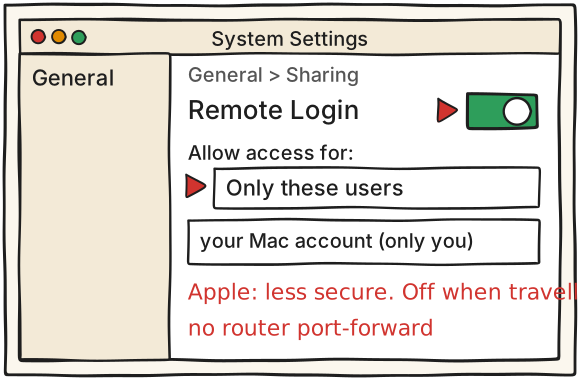
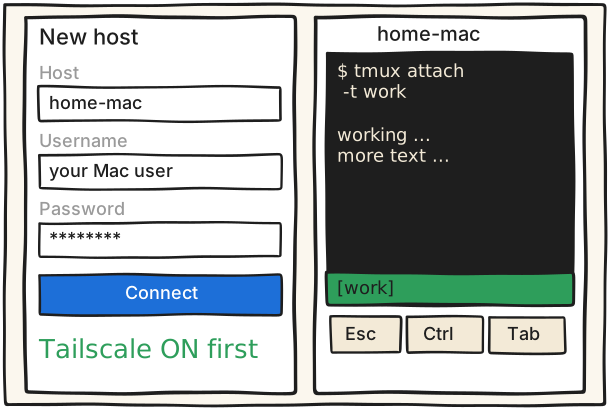
ระวัง Apple เตือนว่าการเปิด Remote Login อาจทำให้ Mac ปลอดภัยน้อยลง และบนโน้ตบุ๊กที่พกไปเชื่อม Wi-Fi อื่นมันอาจตอบเครื่องอื่นใน Wi-Fi นั้นด้วย (ยังไม่ได้ทดสอบ) ใช้ Only these users รหัสผ่านที่แข็งแรง ห้าม port forward และปิด Remote Login ก่อนพกโน้ตบุ๊กออกนอกบ้าน
ยังไม่ได้ตรวจ Apple's Remote Login page opened on 18 Nov 2026 (HTTP 200) and confirms the menu path, 'Only these users', the ssh username@hostname form, the full-disk-access toggle, SFTP and the 'less secure' warning. Still unverified: that Remote Login also answers on the home Wi-Fi or on other Wi-Fi networks a laptop joins (the author's reading; no page says Remote Login is limited to the tailnet and nobody tested it). Setting up key-based login for a phone SSH app was not researched.
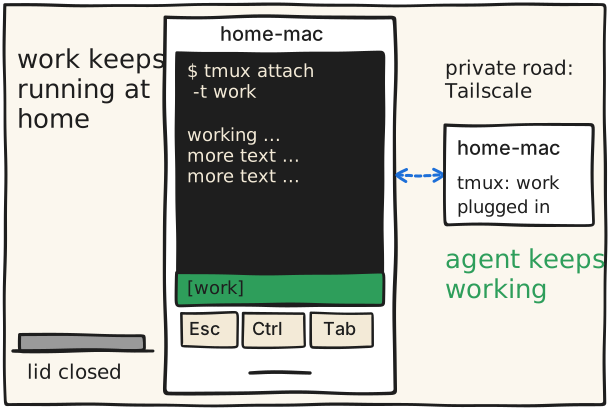
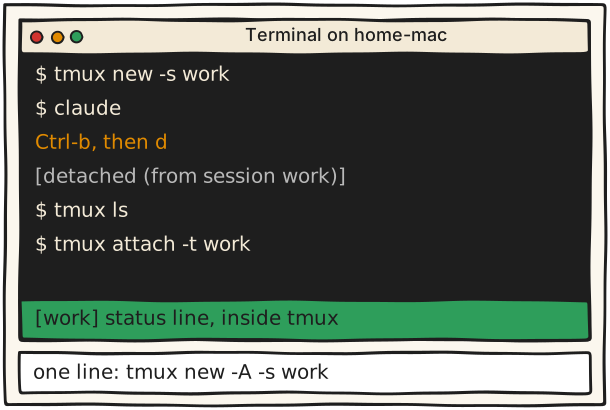
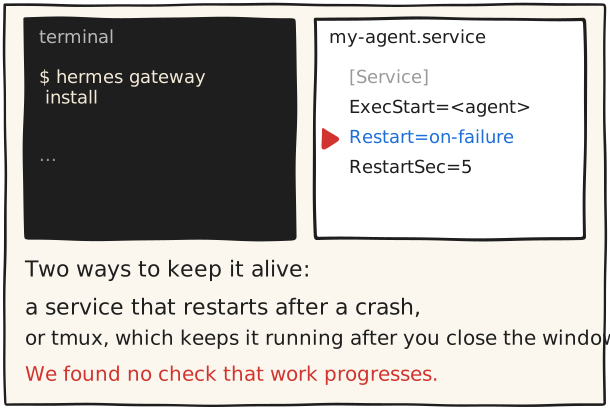
detach: กด Ctrl-b แล้วกด d จะเห็น [detached (from session work)]
ดูรายการ session: tmux ls
กลับเข้า: tmux attach -t work
แบบบรรทัดเดียว (เข้าถ้ามีอยู่แล้ว ถ้าไม่มีก็สร้าง): tmux new -A -s work
เช็กว่ายังอยู่หลัง detach: tmux ls ควรยังเห็น work แล้ว attach กลับมาดูว่า agent ยังอยู่ตรงเดิม
ควรเห็น เห็นแถบสถานะสีเขียวด้านล่าง
ระวัง detach แล้วงานยังรันต่อ แต่ถ้าไม่มีโปรแกรมรันอยู่ใน tmux แล้ว server จะปิดตัวเอง
รันจริงแล้ว Ran on 18 Nov 2026 with tmux 3.8 (installed with `brew install tmux`): `tmux new -d -s work "<a loop that prints a line every second>"` created the session; `tmux ls` listed `work: 1 windows`; it kept running with no terminal attached; `tmux kill-session -t work` ended it. Attaching with `tmux attach -t work` needs a real terminal: without one it printed "open terminal failed: not a terminal". Phone attach itself was not tested.
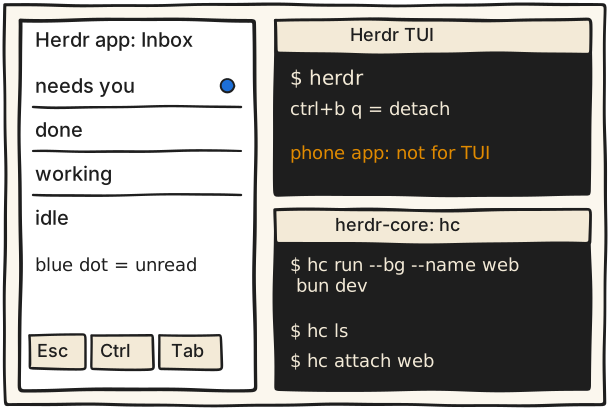
หลังรีสตาร์ตเครื่อง herdr คืน layout และเริ่ม session ของ agent ที่รองรับได้ แต่ the original processes do not survive
ควรเห็น บนมือถือเห็น Inbox แยก needs you / done / working / idle
ระวัง แอปมือถือใช้กับ herdr-core ไม่ใช่ Herdr TUI
ยังไม่ได้ตรวจ No source I opened states which network ports herdr opens; the earlier 'no extra ports found' was an untested reading and is now written as 'no document says'. Everything else on the card is quoted from the herdr README, herdr-core README, herdr.dev/mobile and herdr.dev/tui/docs/persistence-remote (opened 18 Nov 2026). The phone app reaches herdr-core over SSH, so the host needs Remote Login (see e7-04).
รันจริงแล้ว `tmux attach` needs a real terminal (a script without one gets "open terminal failed: not a terminal"). The SSH-from-phone part was not tested: it needs a phone.
ยังไม่ได้ตรวจ Whether Termius needs an account to start: the pricing page does not say (it links to a sign-up page), and nobody opened the app. Whether the SSH apps sync saved passwords across devices is not stated on the pages I opened. The key-row claim for SSH apps (Esc, Ctrl) and the form layout are generic; only the herdr app's key bar is documented. Key-based login was not researched.
รันจริงแล้ว Ran on 18 Nov 2026 (tailscale 1.104.7) with a fake page on 127.0.0.1:3055 and a free HTTPS port: `tailscale serve --bg --https=10000 3055` printed "Available within your tailnet:", the https://<machine>.ts.net:10000/ address, "Serve started and running in the background." and "To disable the proxy, run: tailscale serve --https=10000 off". `tailscale serve status` then listed it as "(tailnet only)". I removed it with the off command and the serve config was identical to before. Plain `tailscale serve --bg 3000` uses HTTPS port 443; if 443 is already used on your machine it replaces that mapping, so check `tailscale serve status` first. Opening the link from a phone was not tested.
ยังไม่ได้ตรวจ The Serve CLI page lists the --bg flag ('Determines whether the command should run as a background process'), the target 'a port number (for example, 3000)', 'tailscale serve status' and 'tailscale serve reset', but does not print the combined form 'tailscale serve --bg 3000' verbatim (its own example is 'tailscale serve localhost:3000'). Not run. The HTTPS public-ledger and rename-first facts were re-opened on 18 Nov 2026. A named example of a real local web tool was left out on purpose.
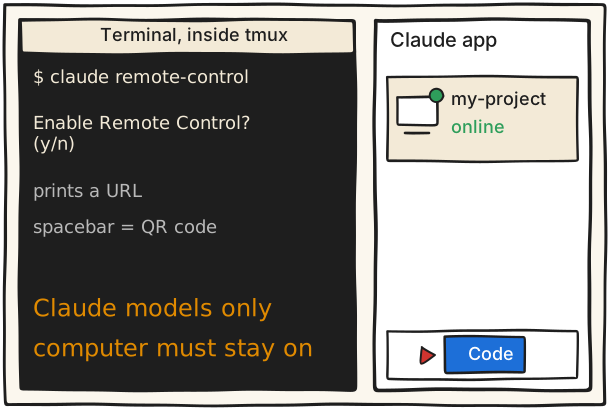
ข้อจำกัด: ใช้ได้กับโมเดล Claude เท่านั้น เพราะ Anthropic doesn't support routing Claude Code to non-Claude models through any gateway; เครื่องต้องเปิดและ claude ต้องรันอยู่ (ถ้าเครื่องยังตื่นแต่ต่อเน็ตไม่ได้ โหมด server จะถอดใจหลังราว 10 นาทีแล้วโปรเซส claude remote-control จบ); คำสั่ง /plugin กับ /resume ใช้จากแอปไม่ได้; เลือก Bypass permissions จากแอปไม่ได้
ปิดทั้งหมดได้ด้วยการตั้ง disableRemoteControl องค์กรที่ใช้ Zero Data Retention หรือ HIPAA เปิดไม่ได้
ควรเห็น เห็น session ที่มีจุดเขียวในแท็บ Code
ระวัง ใช้ได้กับโมเดล Claude เท่านั้น และเครื่องต้องเปิดอยู่ ตามหน้า Claude mobile ถ้าเครื่องหลับระหว่างใช้ Remote Control แล้ว Claude Code จะต่อใหม่เมื่อเครื่องกลับมาออนไลน์
ยังไม่ได้ตรวจ No step was run by anyone. The checklist is the research team's list; the fold-test result and what macOS does to a running agent when the lid closes are not in any doc I opened (Apple's sleep page names only the 'display is off' option). Apple's sleep and Remote Login pages opened on 18 Nov 2026 (HTTP 200); steps 8 and 9 carry the same caveats as cards 7.2 and 7.4 (Remote Login answering on the home LAN is untested).
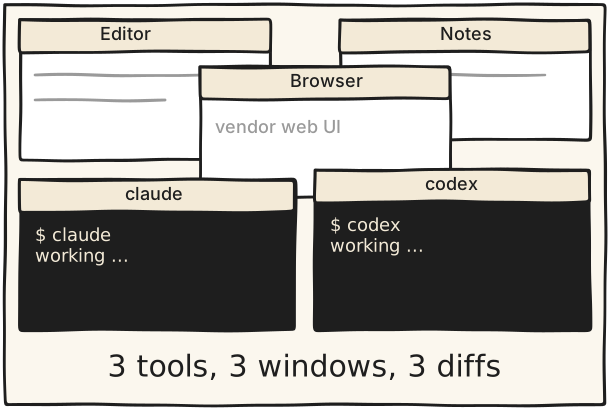
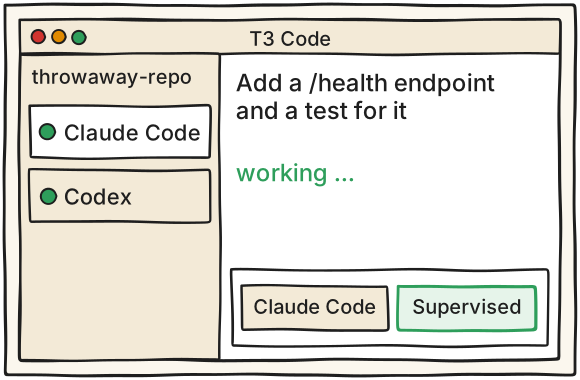
A วันนี้ One task, three tools, three windowsB ผลลัพธ์ One window, two harnesses, one repo
ประโยคเดโมAdd a /health endpoint that returns {ok:true} and a test for it. Don't touch other files.
1 T3 Code คืออะไร และไม่ใช่อะไร What T3 Code is, and is not อ่านเพิ่ม
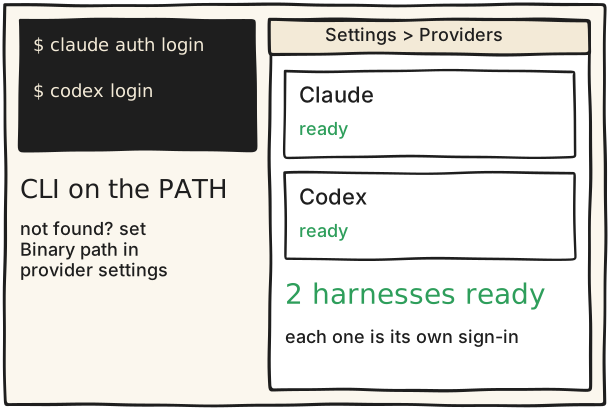
อ่านก่อนติดตั้ง: T3 Code วางอยู่บน harness ที่คุณมีอยู่แล้ว
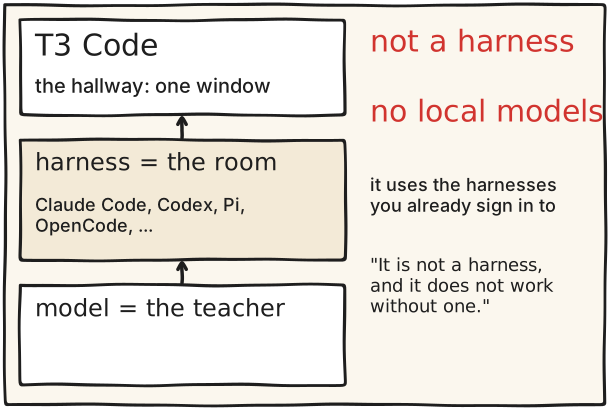
README ของ T3 Code เรียกตัวเองว่า The open-source control plane for coding agents (license MIT) ตัวมันรองรับ Claude Code, Codex, Cursor, OpenCode, Grok Build, Antigravity, Kiro, Pi, Muse Code, fx และ agent ที่รองรับ ACP FAQ ของมันเขียนไว้ชัดว่า T3 Code uses those harnesses. It is not a harness, and it does not work without one. และตอบคำถามเรื่อง local model ว่า No. ดังนั้นอย่าโยงภาพอนาคตเรื่อง RTX กับ local model เข้ากับตอนนี้ ในภาษาห้องทำงาน: โมเดลคืออาจารย์ harness คือห้อง T3 Code คือโถงทางเดินที่ทำให้เดินเข้าห้องไหนก็ได้จากหน้าต่างเดียว คุณจ่ายค่าให้แต่ละค่ายตามเดิม (FAQ: Bring your own sub) FAQ ยังตอบว่าใช้ API key หรือ OpenRouter ได้ (ยังไม่ใช่ local model) และ T3 Code ส่ง basic product usage events โดยไม่ส่ง prompt หรือเนื้อไฟล์ ปิดได้ด้วย T3CODE_TELEMETRY_ENABLED=false (ตาม FAQ)
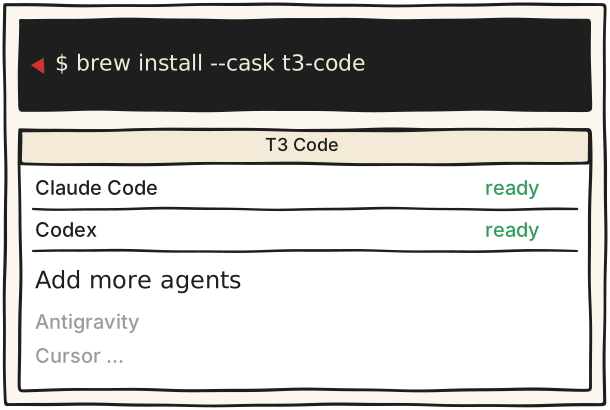
ภาพรวมจาก README (https://github.com/pingdotgg/t3code): ต้องมี agent อย่างน้อยหนึ่งตัวที่ติดตั้งและล็อกอินแล้ว (T3 Code needs one agent that is installed and signed in)
FAQ (https://github.com/pingdotgg/t3code/blob/main/docs/user/faq.md): It is not a harness, and it does not work without one
FAQ: เรื่อง local model ตอบว่า No
FAQ: Bring your own sub คือใช้ Claude, Codex หรือเครื่องมือที่ติดตั้งอยู่แล้ว แอปนี้ฟรีและเป็นโอเพนซอร์ส คุณจ่ายแค่ค่ายที่ใช้อยู่ (FAQ ยังตอบว่าใช้ API key หรือ OpenRouter ได้ แต่ไม่รองรับ local model)
อย่าพูดว่า T3 เป็น agent หรือ T3 รัน Claude: README เรียกมันว่า control plane และคนรัน Claude คือ Claude Code
ยังไม่ต้องเปิดโหมดเข้าถึงจากเครื่องอื่น: อย่ารัน t3 up, t3 connect (เท่ากับ t3 up --connect) หรือ t3 serve --lan และอย่าเปิด Settings → Sharing & access → Network access ตอนนี้ (--lan = รับการเชื่อมต่อจาก local network และ tailnet โดยมี pairing code เป็นด่านเดียว; T3 Connect = ค่าเริ่มต้น any device signed in to your T3 Connect account can open a linked machine; ถ้าจะใช้ในภายหลังให้เปิด Require approval for new devices และถือลิงก์ pairing เหมือนรหัสผ่าน ที่มา: https://github.com/pingdotgg/t3code/blob/main/docs/user/remote-access.md)
หน้า Welcome แสดงโปรเจกต์จากประวัติ Claude Code, Codex และ Pi บนเครื่อง ก่อนเดโมให้ใช้บัญชีผู้ใช้ macOS ใหม่หรือโปรไฟล์ที่สะอาด (หรือรันซ้อมบนการติดตั้งใหม่) เพราะ workspace ที่มีอยู่แล้วจะข้ามหน้านี้ และชื่อโปรเจกต์จริงอาจขึ้นบนจอ
ระวัง หน้า Welcome แสดงโปรเจกต์จากประวัติ Claude Code, Codex และ Pi บนเครื่อง ชื่อโปรเจกต์จริงของคุณอาจขึ้นบนโปรเจกเตอร์ ให้เดโมด้วยบัญชีผู้ใช้หรือโปรไฟล์ที่สะอาด และต้องมี agent อย่างน้อยหนึ่งตัวที่ติดตั้งและล็อกอินแล้ว
รันจริงแล้ว Ran `t3 --help` on 18 Nov 2026: subcommands include up, pair, app, serve, status, doctor; flags include --tailscale-serve, --lan, --host, --no-browser. The install line was not run.
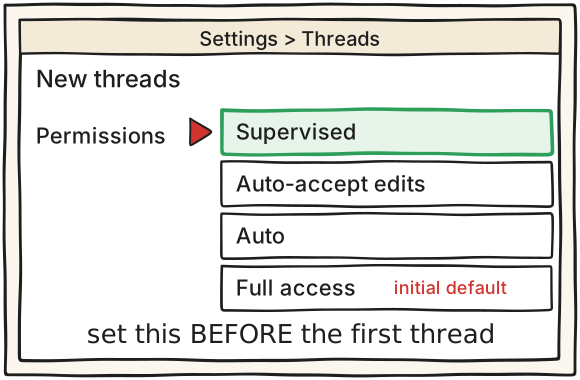
โหมดสิทธิ์มีสี่แบบตามเอกสาร: Supervised, Auto-accept edits, Auto และ Full access และเอกสารระบุตรงๆ ว่า The initial default is Full access และ existing threads and modes you choose in a draft keep their permissions ดังนั้นต้องเปลี่ยนเป็น Supervised ก่อนเปิดเธรดแรกหรือ draft แรก (ถ้าเปิดเธรดไปก่อนแล้ว เธรดนั้นอาจเป็น Full access ให้เริ่มเธรดใหม่) ยิ่งบนโน้ตบุ๊กที่มีโค้ดจริง ให้ใช้ repo ทิ้งได้ (สำเนาของโปรเจกต์เล็กๆ) เอกสารยังบอกว่า Projects can override the environment default จึงต้องเช็กว่าโปรเจกต์ไม่ได้ตั้ง Full access ทับ และ Supervised ไม่ได้แปลว่าทุกอย่างต้องขออนุมัติ: Some read-only actions can proceed in Supervised การส่งงานเดียวกันไปหลายโมเดลต้องใช้ Git project ตามเอกสาร thread-sidebar ดังนั้นโฟลเดอร์ต้องเป็น git repo
เปิดแอปเดสก์ท็อป T3 Code แล้วไปที่ Settings ก่อน ยังไม่ต้องเปิดโปรเจกต์หรือเธรดใดๆ (ถ้าเคยเปิดเธรดไว้ก่อนแล้ว ให้ถือว่าเธรดนั้นอาจเป็น Full access ไม่ใช้ต่อ และเริ่มเธรดใหม่หลังตั้งค่า)
ไปที่ Settings → Threads → New threads → Permissions แล้วเลือก Supervised (ค่าเริ่มต้นคือ Full access)
อ่านที่หน้า permission-modes: existing threads and modes you choose in a draft keep their permissions ดังนั้นการตั้งค่านี้มีผลกับเธรดใหม่ที่เปิดหลังจากนี้เท่านั้น และ Projects can override the environment default เช็กว่าโปรเจกต์ที่จะใช้ไม่ได้ตั้ง Full access ทับ
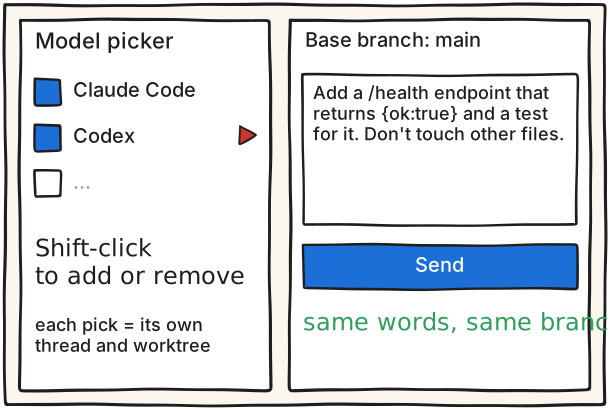
ทาง A (ส่งรอบเดียว): New thread แล้วเปิด model picker Shift-click โมเดลที่ต้องการเพิ่มหรือเอาออก (คลิกธรรมดากลับไปเหลือโมเดลเดียว) เลือก base branch แล้วส่ง ตามเอกสาร Each selection starts a separate thread and worktree
ทาง A ต้องเป็น Git project และยังไม่ยืนยันว่า Shift-click ข้ามค่าย (Claude + Codex) ทำได้ ซ้อมก่อน ถ้าไม่ได้ให้ใช้ทาง B
ทาง B (ส่งสองรอบ): เธรดที่ 1 เลือก Claude เลือก New worktree พิมพ์งานแล้วกด Cmd+Enter (Ctrl+Enter บน Windows/Linux) เพื่อเริ่มเธรดและเปิด draft ถัดไปทันที
draft ถัดไปจะคง workspace mode กับ base branch ที่เลือกไว้ เปลี่ยนโมเดลเป็น Codex แล้ววางข้อความเดิมเป๊ะ แล้วส่ง เมื่อใช้ New worktree ทุกการส่งจะสร้าง worktree ใหม่ของมันเอง
ข้อความงาน (ใช้ถ้อยคำเดียวกัน base branch เดียวกัน): Add a /health endpoint that returns {ok:true} and a test for it. Don't touch other files.
เธรดที่กำลังทำหรือรอจะถูกพับเข้าหัวข้อ Working ที่ยุบอยู่ (ฟีเจอร์ beta เปิดเป็นค่าเริ่มต้น สลับได้ที่ Settings → General → Working section)
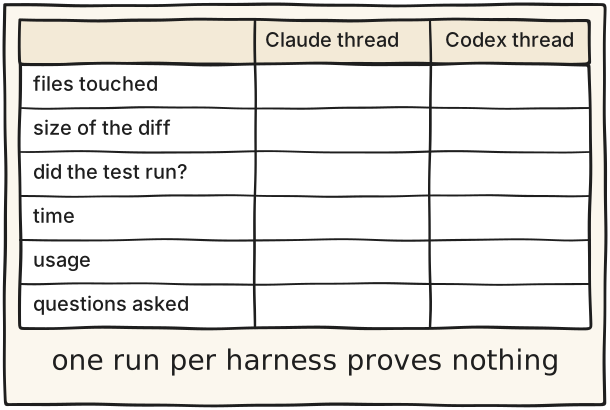
ยังไม่ได้ตรวจ Route A cross-vendor behaviour: the thread-sidebar page says Shift-click adds models and each starts its own thread and worktree, but I did not open the picker source (ModelPickerContent.tsx) and nobody ran it, so 'across Claude and Codex in one send' is unverified. Seeing two threads on screen at once is not described on the thread-sidebar page I read (only a Working section, background starts, side chats in a right panel and an iOS 'beside the parent'); the B screen is drawn as one thread at a time with a thread list for that reason.
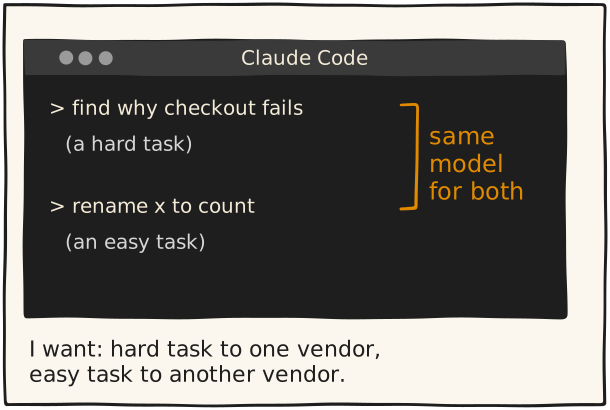
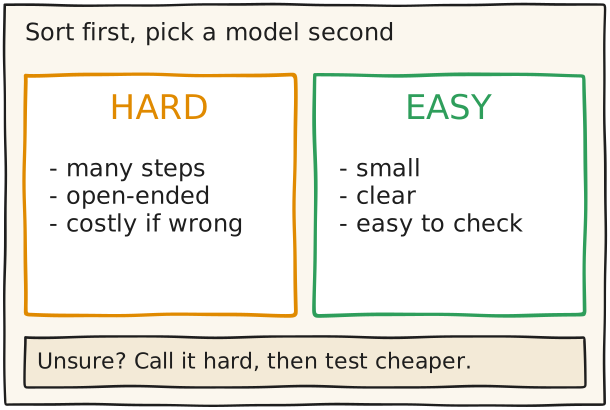
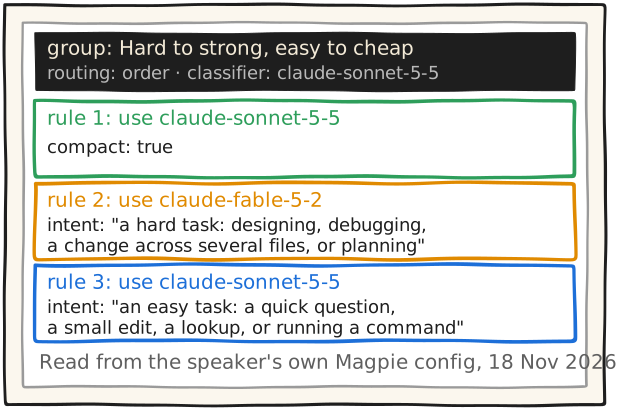
งานที่ลังเลให้นับเป็น HARD ก่อน แล้วลองส่งให้โมเดลที่ถูกกว่า เทียบผลกันเอง
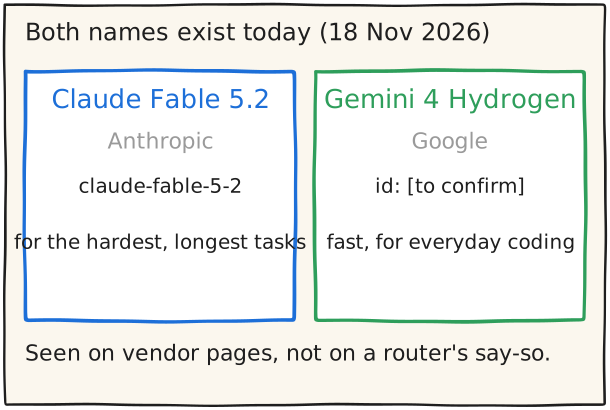
ดูว่าผู้ให้บริการเขียนอะไรไว้เอง (ตรวจเมื่อ 18 Nov 2026): Claude Code alias fable = 'your hardest and longest-running tasks', haiku = 'simple tasks' (https://code.claude.com/docs/en/model-config). Anthropic: Fable/Mythos 'best for the most ambitious, open-ended technical work' และงานโค้ดทั่วไปให้เริ่มที่ Opus 5.5 (https://www.anthropic.com/claude-fable-and-mythos-5-2). Google: Gemini 4 Hydrogen 'speed and efficiency for everyday coding and agentic workflows' (https://blog.google/innovation-and-ai/models-and-research/gemini-models/introducing-gemini-4-hydrogen/)
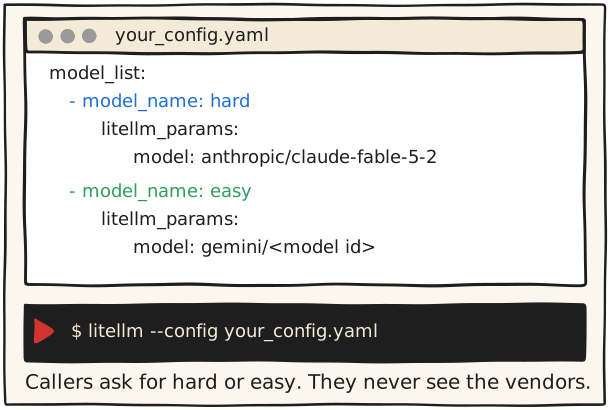
เอาผลที่ได้ไปใส่ในการ์ดถัดไป: ตั้ง agent สองตัวชื่อ deep กับ quick (opencode), หรือสร้าง alias hard กับ easy (LiteLLM)
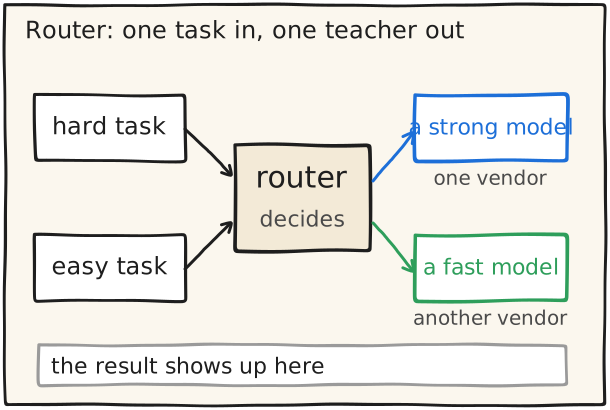
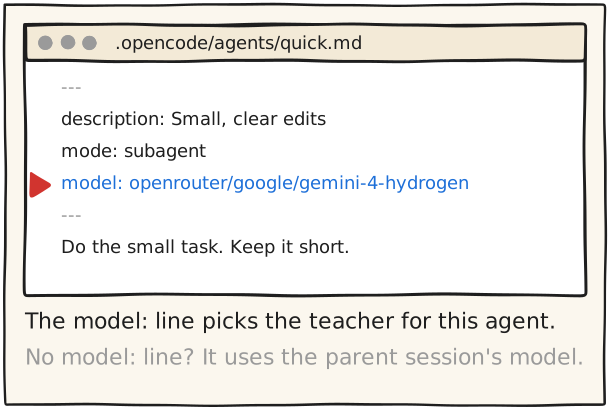
opencode เป็น harness แบบเปิดที่ให้แต่ละ agent มีโมเดลของตัวเอง เอกสารบอกว่า subagent 'uses its configured model, or inherits the parent session's model when none is configured' ทางที่ง่ายที่สุดที่ข้ามเจ้าได้คือใช้ OpenRouter เป็น provider แล้วเรียกโมเดลด้วยรูปแบบ openrouter/<vendor>/<model> เอกสาร opencode ที่อ่านเป็นเวอร์ชัน V2 ถ้า config บนเครื่องคุณไม่ตรง ให้ดูเอกสารของเวอร์ชันที่ติดตั้ง
ติดตั้ง opencode ตามหน้า https://opencode.ai/docs/ (หน้านั้นมีหลายวิธี เช่น curl -fsSL https://opencode.ai/v2/install | bash) แล้วรัน opencode ในโฟลเดอร์โปรเจกต์ (หน้า https://opencode.ai/docs/cli/ เขียนว่า 'Run the CLI in a project to open the full-screen terminal interface')
สร้างไฟล์ .opencode/agents/deep.md ใส่:
---
description: Hard, open-ended or risky work
mode: subagent
model: openrouter/anthropic/claude-fable-5.2
---
Think carefully. Explain your plan before you edit.
สร้างไฟล์ .opencode/agents/quick.md ใส่:
---
description: Small, clear edits
mode: subagent
model: openrouter/google/gemini-4-hydrogen
---
Do the small task. Keep it short.
สั่ง primary agent ตามรูปแบบในเอกสาร เช่น: Use the quick subagent to rename x to count in utils.py และ Use the deep subagent to review my current changes.
สิ่งที่เอกสารบอกว่าจะเกิด: subagent ทำงานใน child session ที่ context ใหม่, 'always run in the background' และ parent ได้รับรายงานเมื่อ child ว่าง
เปลี่ยนเจ้าด้วยการเปลี่ยน slug เป็น google/gemini-4-hydrogen. รายชื่อโมเดลดูได้จาก GET https://openrouter.ai/api/v1/models (ตรวจเมื่อ 18 Nov 2026 พบทั้งสอง slug)
ลำดับสำรอง: ส่ง "models": ["anthropic/claude-fable-5.2", "google/gemini-4-hydrogen"] ตามเอกสาร 'If the first model returns an error, OpenRouter will automatically try the next model in the list.' ตัวทริกเกอร์: context length, moderation, rate limit, provider ล่ม. ราคาคิดตามโมเดลที่ถูกใช้จริง
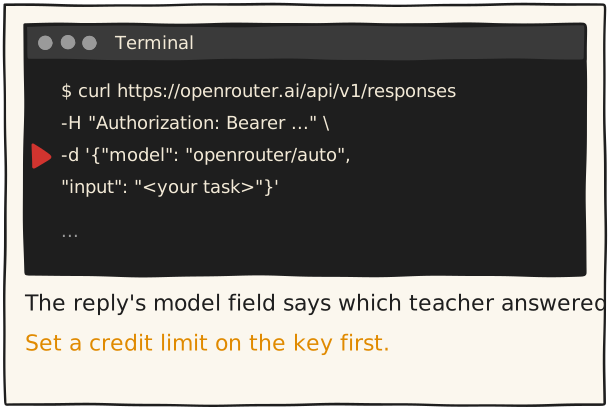
ให้ OpenRouter เลือกเอง: ใส่ "model": "openrouter/auto". เอกสารบอกว่าแต่ละคำขอ 'picks a model and a reasoning effort', ไม่มีค่าธรรมเนียมเพิ่ม (จ่ายตามโมเดลที่ถูกเลือก), จำกัดกลุ่มโมเดลด้วย plugin auto-router + allowed_models เช่น anthropic/*, ใช้ได้เฉพาะ global data region, และ response field model บอกตัวที่ใช้จริง. วิธีเลือกอาจเปลี่ยนตามเวลา ให้อ่านหน้าจริงในวัน talk
รันจริงแล้ว Ran on 19 Nov 2026 in an isolated virtualenv (uv pip install "litellm[proxy]"): `litellm --version` printed "LiteLLM: Current Version = 1.110.0"; `litellm --help` lists --config, --port and --model. The proxy was not started and no model was called.
ยังไม่ได้ตรวจ Not verified: the LiteLLM-side model id for Gemini 4 Hydrogen (card shows a placeholder) and whether LiteLLM's catalog already knows claude-fable-5-2. Tried: LiteLLM provider pages (gemini) and the Anthropic page for the API id; neither lists them. The install line was re-checked on 18 Nov 2026: the quick start gives uv tool install 'litellm[proxy]'; pip appears only in the Python-version warning. Nothing was run.
5 Claude Code ทำอะไรได้บ้างอย่างเป็นทางการ Claude Code limits
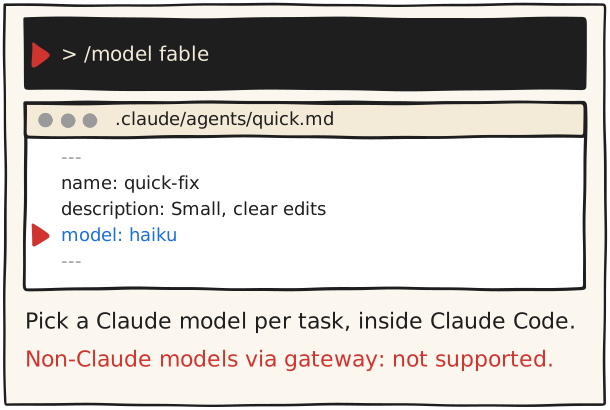
ใน Claude Code เลือกโมเดล Claude ต่อการทำงาน หรือต่อ subagent
/model fable
model: haiku  (in .claude/agents/<name>.md)
ภายใน Claude Code คุณเลือกโมเดลได้ แต่เฉพาะตระกูล Claude: /model สลับทันที, ไฟล์ subagent กำหนด model ได้, และมี opusplan ที่ใช้ opus ตอนวางแผนแล้วสลับเป็น sonnet ตอนลงมือ หน้า gateway ของ Anthropic เขียนว่า 'doesn't support routing Claude Code to non-Claude models through any gateway' คุณจะลองก็ได้ แต่ต้องรู้ว่าอยู่นอกการรองรับและฟีเจอร์ที่ gateway ไม่ส่งต่ออาจใช้ไม่ได้
เปิด Claude Code แล้วพิมพ์ /model fable เพื่อสลับทันที หรือพิมพ์ /model เฉย ๆ เพื่อเปิดตัวเลือก (Enter = บันทึกเป็นค่าเริ่มต้น, s = เฉพาะ session นี้). alias fable = 'your hardest and longest-running tasks' และตอนนี้ชี้ไป Fable 5.2 (ยกเว้นใน Claude apps gateway session ที่ alias fable ชี้ไป Fable 5 ตามหน้า model-config)
เอกสารบอกว่า 'No Fable model is the account-type default on any plan or provider' ต้องเลือกเอง ด้วย /model fable หรือ claude --model fable
alias อื่น: sonnet (งานโค้ดประจำวัน), opus (งานเหตุผลซับซ้อน), haiku (งานง่ายและเร็ว), best (= opus), default (ล้าง override), และ opusplan = 'uses opus during plan mode, then switches to sonnet for execution'
ลำดับความสำคัญของการเลือกโมเดล: /model ใน session > --model ตอนเริ่ม > ANTHROPIC_MODEL > field model ใน settings > ANTHROPIC_DEFAULT_MODEL
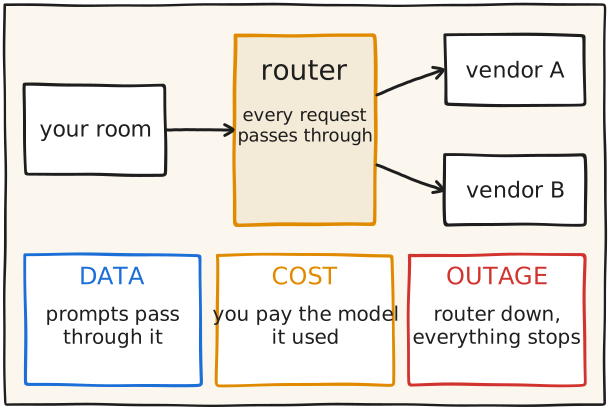
COST (OpenRouter): 'Requests are priced using the model that was ultimately used' แม้เป็น fallback; openrouter/auto ไม่มีค่าธรรมเนียมเพิ่มแต่จ่ายตามโมเดลที่ถูกเลือก; ตั้ง credit limit ทุก key; key ที่ไม่จำกัดเสี่ยงต่อการรั่วและ agent ที่วิ่งไม่หยุด
ยังไม่ได้ตรวจ Two statements are flagged UNVERIFIED in steps (LiteLLM log contents depend on config; OpenRouter's own uptime guarantees were not found in the pages opened).
ตรวจเมื่อ 18 Nov 2026 'Fable' คือ Claude Fable 5.2 ของ Anthropic และ 'Hydrogen' คือ Gemini 4 Hydrogen ของ Google ทั้งสองอยู่ในหน้าทางการและในรายการโมเดลสาธารณะของ OpenRouter ราคาและชื่ออาจเปลี่ยนก่อนวัน talk ให้เช็กอีกครั้ง ภาพ B บนเวทีใช้คำกลาง ๆ 'a strong model' และ 'a fast model' เพราะ router ของผู้พูดเองไม่เปิดเผย ส่วนชื่อจริงอยู่ในการ์ดนี้และในคำสั่งตัวอย่างของการ์ดอื่น
Fable: Claude Fable 5.2, โพสต์ของ Anthropic ลงวันที่ 9 Nov 2026, API model ID claude-fable-5-2, ราคามาตรฐาน $8 ต่อล้าน input token และ $40 ต่อล้าน output token (ตามหน้า Anthropic) https://www.anthropic.com/claude-fable-and-mythos-5-2
Anthropic เขียนว่า Fable/Mythos 'best for the most ambitious, open-ended technical work' และสำหรับงานโค้ดและความรู้ทั่วไปให้เริ่มที่ Opus 5.5 แล้วขยับขึ้นหรือลง
ใน Claude Code alias fable ชี้ไป Fable 5.2 และ 'No Fable model is the account-type default on any plan or provider' https://code.claude.com/docs/en/model-config
Hydrogen: Gemini 4 Hydrogen ของ Google. บล็อก Google เขียนว่าโมเดล frontier อย่าง Carbon และ Argon 'excel at deep, long-horizon reasoning on your hardest problems' ส่วน 'Hydrogen is built for rapid execution across diverse agentic workflows' และเขียนว่า Hydrogen 'surpasses Argon on the Artificial Analysis Intelligence Index' ที่ระดับ thinking high ค่าเริ่มต้น (51 เทียบ 50 ตามหน้านั้น) หน้านั้นไม่ได้จัดอันดับ Hydrogen เทียบกับ Carbon ใน index นี้. context 1 ล้าน token, ราคา $1.50 ต่อล้าน input และ $7.50 ต่อล้าน output https://blog.google/innovation-and-ai/models-and-research/gemini-models/introducing-gemini-4-hydrogen/
ที่ใช้ได้: Antigravity เฉพาะผู้ใช้ Google AI Pro และ Ultra ที่จ่ายเงิน, ส่วน Gemini API และ AI Studio ทุก tier. Antigravity มีตัวเลือก 'Orchestrator' ที่สลับ Carbon (วางแผน) กับ Hydrogen (แก้โค้ดและรันเทสต์) ใน task เดียว (Ultra ได้ Carbon และ Argon, Pro ได้ Argon) https://antigravity.google/blog/gemini-4-hydrogen-in-google-antigravity
API id ของ Hydrogen: ข้อความบทความบนหน้า Google ไม่ระบุ id ลิงก์ AI Studio ในหน้าใช้ model=gemini-4-hydrogen (อยู่ใน URL เท่านั้น) ส่วนใน OpenRouter ใช้ slug google/gemini-4-hydrogen ตามรายการสาธารณะ
รันจริงแล้ว Read `providers.json` in the Magpie config folder on 18 Nov 2026: one group, routing `order`, classifier `claude/claude-sonnet-5-5`, three rules. Only group name, model ids and rule text were read and copied; keys and account fields were not.
ยังไม่ได้ตรวจ Read from the speaker's own local Magpie config on 18 Nov 2026 (no public page). Not verified: what routing: order and compact: true mean in Magpie's docs, and the settings screen layout.
ตอน 10 · The assistant that never sleeps
A วันนี้ Four traits we want, sketchedB ผลลัพธ์ Scorecard: ticked live on stage
1 Continuous: agent เดียว ทุกช่องทาง Continuous
ใน Claude Code รันคำสั่งติดตั้ง แล้วคอมเมนต์ @claude ในอิชชู
ความหมายตามบทความ: 'Users can interact with it directly where they already work, such as IM chats and GitHub comments' และ 'it always feels like one agent' (บทความระบุว่าเป็นเป้าหมายการออกแบบ ไม่ใช่ฟีเจอร์ที่มีอยู่แล้ว)
จากนั้นคอมเมนต์ในอิชชูหรือ PR เช่น @claude fix the TypeError in the user dashboard component (ตัวอย่างจากเอกสาร) Claude ตอบใน thread เดิมและอัปเดตคอมเมนต์ระหว่างทำงาน ผู้คอมเมนต์ต้องมีสิทธิ์เขียน
Secrets: ANTHROPIC_API_KEY หรือ CLAUDE_CODE_OAUTH_TOKEN (สร้างด้วย claude setup-token) เอกสารบอกห้าม commit credential และให้ใช้ GitHub Secrets. ค่าใช้จ่ายมีสองส่วน: GitHub Actions minutes และ API tokens
ความจำข้าม session ใน Claude Code: ไฟล์ CLAUDE.md กับ auto memory ที่ ~/.claude/projects/<project>/memory/ เปิดดูด้วย /memory เอกสารเตือนว่า 'Claude treats them as context, not enforced configuration'
ยังไม่ได้ตรวจ Absence claim, worded as 'we found no ...': the Slack, GitHub Actions, memory and Hermes docs read say nothing about one agent sharing memory across chat and GitHub comments; absence is not proven. Nothing was installed or run.
ความหมายตามบทความ: 'completes several complex tasks in parallel' และ 'It can take the next instruction before the previous command or task has finished'
อัปเดตก่อน: claude update (ถ้า claude agents แสดงแค่ subagent แปลว่าเวอร์ชันเก่า)
เปิด agent view: claude agents พิมพ์ prompt ที่ช่องล่างแล้วกด Enter เอกสารบอกว่า 'Every prompt you enter here starts its own new session' คือพิมพ์อีกอันก็เป็นงานขนานใหม่ ไม่ใช่การตามต่อ
สั่งจาก shell ให้ไปเบื้องหลังเลย: claude --bg "investigate the flaky SettingsChangeDetector test" (ตัวอย่างจากเอกสาร) ใส่ --name เพื่อตั้งชื่อ
ถ้าขึ้น "Workspace not trusted" ให้เปิด claude ในโฟลเดอร์นั้นหนึ่งครั้ง รับ trust prompt แล้วสั่ง claude --bg ใหม่ (ข้อความจริงจากการทดสอบ 18 พ.ย. 2026) claude logs <id> ตอนทดสอบพิมพ์หน้าจอดิบพร้อม escape code ดูผลสั้นๆ ใช้ claude attach <id> จะอ่านง่ายกว่า
ควรเห็น เห็นทุก session แยกตามสถานะ ในหน้าเดียว
ระวัง ครั้งแรกในโฟลเดอร์ใหม่ ต้องรับ trust prompt ก่อน (ขึ้น "Workspace not trusted")
รันจริงแล้ว Ran on 18 Nov 2026 (claude 2.1.327): in a folder never trusted, `claude --bg` stopped with "Workspace not trusted. Run `claude` in <folder> once and accept the trust prompt, then retry." In a trusted folder, `claude --bg --model haiku "Reply with exactly the word ok..."` printed "backgrounded · <id>" with the attach / logs / stop commands; `claude agents --json` showed it as status idle, state done after about 5 s; `claude logs <id>` printed the raw terminal screen with escape codes (not clean text); `claude stop <id>` and `claude rm <id>` worked and the list was empty after. The /agents view and parallel tasks were not tested. Note: that run used part of the weekly limit.
ยังไม่ได้ตรวจ Absence claim, worded as 'we found no ...': no doc read describes an always-on dispatcher that never executes tasks itself; absence is not proven. All agent-view commands and quotes were re-checked against code.claude.com/docs/en/agent-view on 18 Nov 2026. Nothing was run.
รันจริงแล้ว Ran on 18 Nov 2026 (hermes): `hermes cron create "every 24h" "<prompt>" --name <n> --deliver local --paused` printed "Created job: <id>" and "Created PAUSED"; the schedule showed as "every 1440m"; `hermes cron list` listed it as [paused]; `hermes cron remove <id>` printed "Removed job" and the list was empty. The job was never run. `/schedule` in Claude Code was not run.
ยังไม่ได้ตรวจ Absence claim, worded as 'we found no ...': no documented two-stage filter found in the routines, GitHub Actions or Hermes cron pages; absence is not proven. Routines are a research preview and limits can change: re-check on the day.
ความหมายตามบทความ: 'It is always online, connects directly to the user's real working environments' และ 'recovers automatically from anomalies during long-running operation'
tmux (ให้ค้างอยู่หลังปิดหน้าต่าง): tmux new -s mysession เพื่อสร้าง session ชื่อ (หน้า wiki เขียนแบบ tmux new -smysession), รัน agent ข้างใน, กด C-b d เพื่อ detach (ขึ้น [detached (from session mysession)]), tmux ls เพื่อดูรายการ, tmux attach -t mysession เพื่อกลับเข้ามา หน้า wiki บอกว่าโปรแกรมใน session 'running in the background' ต่อ แต่ไม่ได้พูดถึงการสตาร์ทโปรแกรมที่จบไปแล้วใหม่
รันจริงแล้ว Ran `hermes gateway --help` on 18 Nov 2026: setup, install, start, stop, restart, status, uninstall exist ("systemd/launchd background service"). Nothing was installed.
ยังไม่ได้ตรวจ Not verified: the systemctl commands to enable and start a unit (the systemd.service page I opened does not cover them). Absence claim, worded as 'we found no ...': none of the docs read check that work truly progresses; Hermes has an event-loop watchdog that restarts a frozen gateway, but no progress check was described; absence is not proven. The unit file is assembled by us from Example 3 plus Restart lines, not copied from the page. Nothing was run.
บทความ 'Exploring Super-agent Design' (@DeepSeekHarness): 'This article discusses architectural ideas. It is not an introduction to existing features of DeepSeek Harness.' กลไก async 'is not yet enabled by default' และ plugin 'is only a prototype'. ผู้เขียนระบุว่า instance ภายในของตน 'is already running continuously' แต่ไม่ได้บอกว่ามีครบสี่ข้อ. การ์ดนี้ไม่บอกว่าใครมีครบสี่แล้ว และไม่บอกว่าไม่มีใครมี
ยังไม่ได้ตรวจ Absence claim: no doc we read shows one product with all four traits; this is not proven. The card says 'as found'. 'What I am trying next' is a placeholder the speaker fills. Everything else is backed by the pages in src.
ต้นฉบับ: https://x.com/DeepSeekHarness/status/2116857257245987236 (มุมมองบทความ https://x.com/DeepSeekHarness/article/2116857257245987236). วันที่โพสต์ 1 Nov 2026 (หน้า status แสดง '11:37 AM · Nov 1, 2026'; มุมมองบทความแสดงแค่ 'Nov' ไม่มีปี). ต้นฉบับเป็นภาษาจีน ฉบับอังกฤษเป็น machine translation
ข้อสงวน (คำต่อคำ): 'This article discusses architectural ideas. It is not an introduction to existing features of DeepSeek Harness.' / 'DeepSeek Harness already implements this asynchronous task mechanism, but it is not yet enabled by default.' / 'This plugin is only a prototype for validating the technical approach, not an official DeepSeek product.'
ที่ผู้เขียนเขียนเองด้วย (ประโยคปิดท้ายบทความ): 'Our internal Super-agent instance, built on these ideas and on DeepSeek Harness, is already running continuously.' คือ instance ภายในของผู้เขียนรันต่อเนื่องอยู่แล้ว แต่บทความไม่ได้บอกว่า instance นั้นมีครบทั้งสี่ข้อ และข้อสงวนด้านบนยังใช้ตามเดิม
สี่ลักษณะ: Continuous ('it always feels like one agent'), Productive ('completes several complex tasks in parallel'; 'It can take the next instruction before the previous command or task has finished'), Proactive ('It monitors events in its environment, acts on anything worth handling, and stays quiet otherwise'), Persistent ('It is always online'; 'recovers automatically from anomalies during long-running operation')
มันอ่านอะไรได้: เอกสาร Claude Code ใน Slack เตือนว่า Claude 'may follow directions from other messages in the context' ให้ใช้เฉพาะในบทสนทนาที่เชื่อถือได้